Product requirements (PRD)
Why the HOCO B2B ecosystem is built, for whom and in which release — goals, personas, user stories with acceptance criteria, scope boundaries, risks and success metrics.
How this PRD relates to the other documents
This page answers why and what: the outcomes HOCO expects, who uses each interface, the stories every release must satisfy and what is deliberately left out. It is the entry point; the other documents are the reference.
- SRS (specification) — the binding how. Every requirement ID quoted here (
ORD-08,FLD-12…) is defined incontent/spec/requirements.jsonand detailed on its SRS page, together with business rules, lifecycles, the permissions matrix and the acceptance scenarios. When this page and the SRS disagree, the SRS and the canonical JSON files win and this page is corrected. - Plan (timeline) —
content/plan/tasks.jsonis the only source of dates. This page never types a date: phase windows and milestones below are computed live by the scheduler. Task IDs (SRV-16,MDA-05…) link to the team tasks. - Design (design) — screens are referenced by ID (
RA-xxreseller app,DA-xxdelegate app,BO-xxback-office,RW-xxreseller web) and specified in the screen inventory. The 16 client reference screens are visual direction, not specification. - API reference (API) — operations are referenced by op id (
cart.checkout). The OpenAPI 3.1 document generated frompackages/contractsis the executable truth; the user flows show how operations chain into journeys.
1. Introduction
Where HOCO is today
HOCO distributes phone accessories of three brands — HOCO, ACEFAST and BOROFONE — to a B2B network of resellers (revendeurs: phone-accessory and electronics shops) in Algeria, served by field sales representatives (délégués commerciaux). The network runs on phone calls, WhatsApp messages and spreadsheets; the ecosystem must "progressively replace" these scattered exchanges by "a single, reliable and measurable platform" (cahier §1.1).
Assumption — the cahier does not describe today's process in detail. The consequences below are inferred from the objectives of cahier §1.3 and are to be confirmed during the cadrage workshop (PRJ-03):
| Today | Consequence | Answered by |
|---|---|---|
| Orders arrive as WhatsApp messages or calls and are re-typed at HOCO | Wrong references and quantities, no order number to quote, no status after ordering | Reseller app ordering and tracking (ORD-03, ORD-07) |
| Prices, stock and a reseller's balance are known by asking | Promises made on stock that is gone; disputes about prices | The price of the reseller's customer type and live availability (PRC-02, STK-07), finance view (FIN-10) |
| A shop asks about an order or a faulty product by phone | Claims and returns are untraceable; stock is not put back | Order status live in the app (ORD-15), after-sales claims and returns with automatic restock (SUP-04, ORD-13) |
| Shop data lives in several files and phones | The same shop exists twice; nobody knows which delegate owns it | One CRM record per shop, unique phone (CRM-03), assignment (CRM-05) |
| Field work is reported by phone at the end of the day | No view of tours, visits or conversions while they happen | Tours, GPS check-in and live follow-up (FLD-08, FLD-13) |
| Indicators are rebuilt by hand | Late and contradictory figures for revenue, conversion, stock-outs, unpaid amounts | Permission-aware dashboards and reports (ANA-01, ANA-03) |
Vision
The target of cahier §1.2 has four parts, delivered as five software products:
- A central back-office to steer the activity and administer every piece of data.
- A reseller application for direct ordering and commercial follow-up.
- A delegate application for prospecting, field visits, sign-up and first-order assistance.
- A common API and database that keep every interface synchronised in real time.
Three product principles follow from it and drive every decision in this document:
- One record per shop, from first visit to active reseller. The prospect a delegate registers on the pavement is the account the owner claims in the app and the customer finance invoices — never a copy (AUTH-05, CRM-04).
- Same rules whoever enters the order. Prices, stock, minimums and credit are checked identically for a reseller order, an assisted order and a back-office phone order, and every order is confirmed by a person in the back-office before preparation — nothing is confirmed automatically (ORD-02, ORD-08, ORD-11, ORD-14).
- Resellers see what they need, never more. One price — the one of their customer type (Super-gros, Demi-gros or Détail) — and availability (En stock / En rupture), never a stock quantity; visitors without an account browse without prices (PRC-02, STK-07, AUTH-10).
- Everything that matters is measured. Each success indicator of cahier §1.4 has one formula, computed from system data and shown with the same value in every dashboard and export (see Goals).
Deliverables and owners
| # | Deliverable | Used by | Built by | Technology | Built in |
|---|---|---|---|---|---|
| 1 | Central API server (@hoco/server) | every interface | Anis | Node 22, Express 5, oRPC (contract-first REST + OpenAPI 3.1), Zod 4, Prisma 7, PostgreSQL 17, Redis 7 + BullMQ, Better Auth | P0 → P1 (V1), P4 (V2) |
| 2 | Back-office dashboard (@hoco/dashboard) | six staff roles | Anis | Next.js 16 App Router, React 19, Tailwind 4, @hoco/ui, TanStack Query/Table/Form, next-intl | P1 |
| 3 | Reseller mobile app (dz.hoco.reseller) | resellers | Imad | Flutter, Android first | P0 foundations → P1 |
| 4 | Delegate mobile app (dz.hoco.delegate) | delegates | Imad | Flutter, offline-first (drift + outbox) | P0 foundations → P1 |
| 5 | Reseller web app (@hoco/web) | resellers on a computer or an iPhone | Anis | Next.js, same stack as the back-office | P1 (V1, before acceptance) |
The server, back-office, reseller web and this documentation site live in the AnisBetehi/hoco monorepo; both Flutter apps live in hoco-mobile under Imad's GitHub account. Akram designs every interface in Claude Design — design system first, then screens — over 21 working days (DES-01 to DES-21). The reseller web is a team decision that is not in the cahier (RWA-01); it reuses the reseller app's API and rules, is part of V1 and goes through acceptance and the pilot with the other interfaces.
The whole V1 — design, development and deployment — fits in a three-month frame that starts on Sunday 18 Oct 2026 and ends in mid-January 2027: production go-live at the start of January, a two-week pilot right after, generalisation and V2 after the three months (see the release plan). No application code is written before this documentation is done; every build task starts from these specifications.
The ecosystem at a glance
Cahier §2 sets the principle: the three solutions use one secured central API and one database, and every authorised creation or update is synchronised according to the user's rights.
The exchange principles of cahier §2.1, as they apply to the five products:
- Back-office → apps — products, prices, stock, promotions, tours and objectives are published by the back-office and read by the apps through the API; the delegate app pulls them into its local database with
sync.delta(SYN-01). - Reseller app and web → back-office — sign-ups, orders, addresses, payment declarations, support requests and claims (SYN-02).
- Delegate app → back-office — positions during tours, visits, prospects, photos, assisted orders and reports, replayed through
sync.batchwhen the network was missing (SYN-02, SYN-05). - Events — every important change writes an outbox event in the same transaction; the worker turns it into notifications (inbox, push, SMS, email), real-time events and activity-journal entries (NOT-05, SYN-07, AUD-01). There are two live streams: the back-office stream (new orders, check-ins, tours, positions, stock alerts, pending accounts, returns, claims) and each reseller's own stream, which updates order screens while the app or the web page is open (ORD-15).
Scale of the specification
Counted from the canonical files on 17 Oct 2026, after the product decisions of that day. The data-driven tables of this site always show the live figures.
| Artefact | Count | Breakdown | Canonical file |
|---|---|---|---|
| Requirements | 194 in 25 areas | 177 V1 · 17 V2 — 155 MUST · 33 SHOULD · 6 COULD | content/spec/requirements.json |
| Screens | 155 | reseller app 41 · delegate app 28 · back-office 71 · reseller web 15 — 146 V1 · 9 V2; back-office V1 = 21 bespoke + 45 template screens | content/spec/screens.json |
| API operations | 286 entries in 30 groups | 271 V1 · 15 V2 — 144 back-office · 11 public · 15 open to guests (catalog, banners, promotions, WhatsApp support); 27 entries bundle CRUD methods (88 methods) | content/spec/endpoints.json |
| Enums and statuses | 54 | every status with its API value, French label and tone | content/spec/enums.json |
| Plan | 145 tasks · 19 milestones · 3 people | P0 45 · P1 76 · P2 7 · P3 4 · P4 13 | content/plan/tasks.json |
Product decisions of 17 October 2026
After the first drafts the team took ten binding decisions, applied throughout this PRD and the SRS: availability-only stock for resellers and guests (STK-07); no automatic order confirmation (ORD-14); live order status for resellers (ORD-15); three prices per variant by customer type (PRC-01, PRC-02); customer type declared at sign-up (AUTH-11); guest browsing without prices (AUTH-10); advanced filters with facets and per-category attributes (CAT-12, CAT-13); a regional WhatsApp support button (SUP-05, ADM-08); after-sales claims in V1 (SUP-04); returns and credit notes in V1 with automatic restock on cancellation and return (ORD-13, STK-03, FIN-08). Their open points are in the decision register.
1.1 Release plan
Phases
The plan groups the cahier's ten-phase roadmap (cahier §14) into five phases; the phase is the release field of every task. P0 to P2 form the three-month V1 frame (decided on 18 Oct 2026): design, development and deployment of the five products, production go-live at the start of January 2027 and a two-week pilot right after. P3 and P4 come after the three months. The milestones table below checks Production go-live and Pilot starts against the frame's deadline.
| Phase | Cahier roadmap (§14) | Exit milestones |
|---|---|---|
| P0 — Foundations (cadrage, UX/UI, architecture & contract) | 1 Cadrage · 2 UX/UI · 3 Architecture | Cadrage validated — validation sheet signed · API contract v1 published (OpenAPI + mock server) · Design handoff complete · Mobile foundations ready |
| P1 — V1 build & integration (including the reseller web) | 4 Back-office V1 · 5 App revendeur V1 · 6 App délégué V1 · 7 Intégration · 8 Tests (technical and functional) | Server V1 feature-complete · Mobile apps V1 feature-complete · Back-office and reseller web V1 feature-complete · Staging integration complete |
| P2 — Acceptance, go-live & pilot | 8 Tests (acceptance) · 9 Pilote | Acceptance report (PV de recette) signed · Production go-live · Pilot starts · Pilot go / no-go |
| P3 — Generalisation (after the three months) | 10 Généralisation | Generalisation complete |
| P4 — V2 evolutions | §14.2 Évolutions V2 | V2 delivered |
P0 — Foundations. The cadrage workshop (PRJ-03) walks HOCO through this PRD and the decision register and gets the cahier's validation sheet signed. Anis then follows a strict sequence — service catalogue (SRV-01), database schema (SRV-02), API contract v1 with a mock server (SRV-03) — because the contract is what unblocks the mobile track: Imad generates the Dart client from it (MOB-03) and builds against the mock while the real modules are written. In parallel Akram spends four days on the design system before validating the screen inventory and drawing screens day by day (DES-01 to DES-21), and Imad lays the Flutter foundations: monorepo, core package, design system, navigation, authentication, push, offline outbox, location and media (MOB-01 to MOB-11).
P1 — V1 build & integration. Server modules come in dependency order (geography, catalog with attributes and facets, the three-price pricing engine, inventory, CRM, cart, orders, promotions, field operations, invitations, sync, delivery, billing, support, returns and after-sales, the two real-time streams — SRV-10 to SRV-26, with SRV-20 for returns and after-sales), then the back-office pages (DSH-01 to DSH-13) and the reseller web, which reuses the back-office foundation and the reseller API (WEB-01 to WEB-05). Imad builds the reseller app (MRA-01 to MRA-10) then the delegate app (MDA-01 to MDA-12) as soon as each design day is delivered. The phase ends with staging integration on the real API (MOB-12), a field test in Oran-like conditions (MOB-13), Play Store readiness (MOB-14), server hardening (SRV-28), design QA and Akram's scripted functional campaign (QA-03). HOCO's feedback on the designs is consolidated once (DES-22); the V2 designs are drawn during this phase so that V2 can start right after generalisation (DES-30).
P2 — Acceptance, go-live & pilot. The 15 priority scenarios of cahier §12 are run end to end on staging across the four interfaces, reseller web included (QA-01), then executed by HOCO on pre-production until the acceptance report is signed (QA-02, OPS-05). Production goes live with the initial import of products, resellers and users (LCH-01); administrators, managers and pilot delegates are trained (LCH-02); a two-week pilot with a limited group of delegates and resellers runs in production with daily triage (LCH-03, LCH-03B) and ends with a go / no-go based on the pilot criteria.
The pilot ends well before Ramadan (expected from about 8 February 2027), so field hours are normal during the pilot.
P3 — Generalisation (after the three months). Pilot findings are fixed first (LCH-04, MOB-18); then the roll-out opens zone by zone, trains the remaining delegates and promotes the apps to the public Play track (LCH-05). The iOS build runs in this phase only if HOCO decides it (MOB-16, D-10).
P4 — V2 evolutions. The V2 contract is published first so the mobile V2 work starts against the mock server (SRV-29); then loyalty, packs, detailed credit with reminders and accounting export, carrier and WhatsApp Business integrations, tour optimisation with stock-system sync, and advanced analytics (SRV-30 to SRV-38), with their back-office, reseller and delegate surfaces. Returns and after-sales are no longer V2: they ship in V1.
Plan and milestones
Live figures from content/plan/tasks.json — open effort and computed window per phase, then per person, then every milestone. See the timeline for the Gantt chart and progress for what is done.
119 open tasks · 173.75 d of planned effort (434.25 d from scratch) · plan ends 22 Feb 2027
| Phase | Effort | Start | End |
|---|---|---|---|
| P0 — Foundations (cadrage, UX/UI, architecture & contract) | 36.25 d | 18 Oct 2026 | 16 Nov 2026 |
| P1 — V1 build & integration | 73 d | 08 Nov 2026 | 27 Dec 2026 |
| P2 — Acceptance, go-live & pilot | 27.5 d | 23 Dec 2026 | 14 Jan 2027 |
| P3 — Generalisation (after the 3 months) | 10.5 d | 14 Jan 2027 | 24 Jan 2027 |
| P4 — V2 evolutions | 26.5 d | 21 Jan 2027 | 22 Feb 2027 |
| Person | Role | Effort | Tasks | Window | Owns |
|---|---|---|---|---|---|
| Anis | Full-stack developer · 1 FTE | 60.75 d | 39 | 18 Oct 2026 → 18 Feb 2027 | Server (API), back-office dashboard, reseller web app, docs, DevOps |
| Imad | Mobile developer (Flutter) · 1 FTE | 69.75 d | 44 | 18 Oct 2026 → 31 Jan 2027 | Reseller app and delegate app (Flutter monorepo) |
| Akram | UI/UX designer · 1 FTE | 43.25 d | 36 | 18 Oct 2026 → 22 Feb 2027 | Design system and every interface, design QA, training and store assets |
3-month frame: design → development → deployment — deadline 17 Jan 2027.
| Date | Milestone | Target | Reached when these tasks end |
|---|---|---|---|
| 18 Oct 2026 | Cadrage validated — validation sheet signed | — | PRJ-03 |
| 18 Oct 2026 | API contract v1 published (OpenAPI + mock server) | — | SRV-03 |
| 19 Oct 2026 | Server V1 feature-complete | — | SRV-26, SRV-40 |
| 21 Oct 2026 | Design system v1 ready (tokens + components) | — | DES-04 |
| 22 Oct 2026 | Screen inventory frozen | — | DES-05 |
| 29 Oct 2026 | Reseller app designs ready for client review | — | DES-10 |
| 05 Nov 2026 | Delegate app designs ready for client review | — | DES-14 |
| 08 Nov 2026 | Mobile foundations ready | — | MOB-11 |
| 12 Nov 2026 | Back-office designs ready for client review | — | DES-19 |
| 16 Nov 2026 | Design handoff complete | — | DES-21 |
| 03 Dec 2026 | Back-office and reseller web V1 feature-complete | — | DSH-12, WEB-05, WEB-06 |
| 15 Dec 2026 | Mobile apps V1 feature-complete | — | MDA-12 |
| 22 Dec 2026 | Staging integration complete | — | MOB-14, SRV-28 |
| 28 Dec 2026 | Acceptance report (PV de recette) signed | — | QA-02 |
| 29 Dec 2026 | Production go-live | on time — 17 Jan 2027 | LCH-01 |
| 30 Dec 2026 | Pilot starts | on time — 17 Jan 2027 | LCH-02 |
| 14 Jan 2027 | Pilot go / no-go | — | LCH-03, LCH-03B |
| 21 Jan 2027 | Generalisation complete | — | LCH-05 |
| 22 Feb 2027 | V2 delivered | — | SRV-38, DSH-21, MDA-20, WEB-20, DQA-12 |
V1 scope by surface
Cahier §14.1 ("Version V1 recommandée") per surface, and what V1 delivers on each.
| Surface | Cahier §14.1 | What V1 delivers | V1 screens | Built by |
|---|---|---|---|---|
| Back-office | CRM, catalogue, stock, commandes, délégués, tournées, notifications et rapports essentiels | Role-based shell and five dashboards (general, sales, field with live map, stock, finance); CRM list, map, 360° page, validation queue with customer-type review, follow-ups, segments; catalog with the three customer-type prices, category tree, per-category attributes, product import; stock overview, movement journal, receipts, adjustments, inventory sessions, warehouses; the « Commandes à confirmer » queue — every order is confirmed by hand — with automatic controls, override, modification, refusal and phone orders; returns and after-sales claims with automatic restock and credit notes; delivery board with picking list and proof; V1 finance (invoices, payments and declarations, credit accounts, credit notes); promotions, banners, daily offers; delegates, zones, objectives, tour planner and editor, live tour detail, visits, visit types; tickets, announcements, notification templates and rules; reports and export centre; users, roles matrix, activity log, settings, reference lists, support regions and WhatsApp numbers, app versions, data imports | 66 — BO-01 to BO-71 without the V2 screens | Anis — DSH-01 to DSH-13 |
| Reseller app | compte, catalogue, panier, commande, suivi, promotions simples et support | Guest browsing without prices; sign-up with OTP, declared customer type and account claim, pending-validation state, sign-in, password reset; home, search, barcode scan, catalog with advanced filters and facets, product detail with availability only, favourites; server-side cart, checkout, address book, confirmation; orders with live status, tracking, assisted-order confirmation, return requests; promotions and daily offers; notifications; account, store profile and documents, balance and credit, invoices, payment declaration; support tickets, after-sales claims and the regional WhatsApp button; settings; system states | 38 — RA-01 to RA-36, RA-40, RA-41 | Imad — MOB-05, MOB-06, MRA-01 to MRA-10 |
| Reseller web | not in the cahier — team decision | Same V1 features and the same account, cart and orders as the reseller app — guest browsing, advanced sidebar filters, live order tracking, returns, after-sales claims, WhatsApp button — in responsive layouts; invitation landing /i/{code} | 14 — RW-01 to RW-14 | Anis — WEB-01 to WEB-05 (P1) |
| Delegate app | tournée, GPS, visite, prospect, invitation, première commande, rapport et bilan | Sign-in, location consent; home with counters and objectives; tour programme and calendar; map and navigation; GPS check-in within tolerance; visit with checklist, note, photos; not-done reasons; structured report and follow-ups; prospects list and offline sign-up; invitation with QR and activation steps; first-order assistance and orders of my resellers; tour closing, reports and performance; messages, settings, sync centre; location sampling during tours | 28 — DA-01 to DA-28 | Imad — MDA-01 to MDA-12 |
| Server | API centrale (cahier §2): authentification, règles métier, permissions, synchronisation, notifications et intégrations | Authentication with guest access, customer type, OTP and account claim; RBAC and data scopes; audit, numbering, settings, files, PDF; jobs, outbox and notifications (inbox, push, SMS, email); every business module except loyalty and packs — including attributes and facets, three-price resolution, returns, after-sales and credit notes; offline sync; the back-office and reseller real-time streams; support regions; analytics, reports and exports; data imports; hardening | 271 V1 operation entries | Anis — SRV-01 to SRV-28 |
V2 scope by surface
Cahier §14.2 ("Évolutions V2"): advanced loyalty, profitable packs, detailed credit and returns/after-sales; delivery, WhatsApp Business and accounting integrations; automatic tour optimisation and advanced analytics. The team moved returns and after-sales to V1 (decision of 17 Oct 2026), added per-reseller price agreements to V2, and the plan places the stock-system API synchronisation of cahier §11 in V2.
| Surface | What V2 adds | Requirements | V2 screens | Built by |
|---|---|---|---|---|
| Back-office | Overdue board and reminders, credit policy editor, accounting exports; packs editor; loyalty settings and levels; rewards and redemptions | FIN-06, FIN-07, FIN-09, PRM-06, LOY-01 to LOY-05 | BO-47, BO-48, BO-52, BO-53, BO-54 | Anis — DSH-20, DSH-21 |
| Reseller app | Packs, points and level progress (Bronze, Silver, Gold, VIP), rewards and redemption | PRM-06, LOY-03, LOY-04, LOY-05 | RA-37 to RA-39 | Imad — MRA-20 |
| Reseller web | Loyalty, rewards and packs on the web | LOY-03, LOY-04, PRM-06 | RW-15 | Anis — WEB-20 |
| Delegate app | Optimised routes with time windows and richer field analytics on existing screens | FLD-18, ANA-06 | none new | Imad — MDA-20 |
| Server | V2 contract; loyalty engine; packs; detailed credit, reminders and accounting export; per-reseller price agreements and level-based prices; carrier API and WhatsApp Business; routing-engine tour optimisation and stock-system sync; advanced analytics; duplicate merge | LOY-01, LOY-02, FIN-06, FIN-07, FIN-09, PRC-03, DLV-05, NOT-08, INT-06, STK-09, FLD-18, ANA-06, CRM-13 | 15 V2 operation entries | Anis — SRV-29 to SRV-38 |
Three months, no slack on Anis's lane
The server, the back-office and the reseller web all run through Anis's lane, which therefore sets the go-live date (RWA-01, RWA-02). The reseller web is built at the end of P1, after the back-office, and is accepted and piloted with the rest — iPhone and desktop resellers use it from the pilot on. A slip on that lane is handled the same week with the levers listed on the timeline — spend the visible buffers, move non-essential V1 scope after go-live with HOCO's agreement, shorten the pilot, add a second TypeScript developer — never by silently cutting scope. See the risks.
2. Goals
HOCO has no measured baseline today: orders, visits and conversions are not recorded in a system, so nobody knows the current share of orders that would count as "digital" or the current visit completion rate. Every target below is therefore proposed — to validate with HOCO at the cadrage workshop, measured for the first time during the pilot, and re-based at the Pilot go / no-go milestone. Formulas are fixed now so that the dashboards, the reports and the exports compute them identically (ANA-04).
Conventions used in every formula:
- Validated order — an order that reached
VALIDATEDand was not laterCANCELLED; its value is the order total TTC in DZD. - Active reseller — a reseller record in commercial status
ACTIVEat the end of the period (status set automatically, see the reseller lifecycle). - Business time — working days Sunday to Thursday in
Africa/Algiers, excluding the holidays of the plan; business hours come from the settings. - Cohort — a group of records counted by the month they were created, followed over a fixed window (30 or 60 days) so that late months are not penalised.
Business objectives as measurable goals
| # | Objective (cahier §1.3) | Goal | Metric and formula | Proposed target (proposed — to validate with HOCO) |
|---|---|---|---|---|
| G1 | Centraliser les informations des revendeurs et prospects | One complete record per shop | Complete-record rate = records with phone, wilaya, commune, address, GPS position and assigned delegate ÷ records not NOT_INTERESTED; duplicate main phones = 0 by construction (CRM-03) | ≥ 95 % of active resellers complete three months after generalisation |
| G2 | Développer le nombre de points de vente actifs | Grow the ordering network | Active points of sale = count of active resellers at month end, by wilaya and delegate | +20 % six months after generalisation, against the count measured after the initial import |
| G3 | Accélérer la prise et la validation des commandes | Orders arrive structured and are confirmed by a person quickly — no order is confirmed automatically (ORD-14), so the confirmation queue is the bottleneck to watch | Confirmation lead time = business hours from SUBMITTED to VALIDATED or REFUSED; queue age = age of the oldest order in « Commandes à confirmer » | median ≤ 2 business hours; 90th percentile within the same business day; no order older than one business day in the queue |
| G4 | Suivre les délégués, les tournées, les visites et les conversions | Every planned visit has a visible outcome | Outcome coverage = planned visits DONE or NOT_DONE with a reason ÷ planned visits of closed tours; same-day closing = tours COMPLETED on their date ÷ tours started | 100 % outcome coverage (enforced at closing, FLD-12); ≥ 95 % same-day closing |
| G5 | Réduire les erreurs liées aux commandes manuelles | Fewer corrections and error cancellations | Correction rate = orders with at least one back-office line modification ÷ orders submitted; error cancellations = cancellations whose reason is flagged as an error in ORDER_CANCEL_REASON ÷ orders submitted | correction rate ≤ 5 %; error cancellations ≤ 2 % |
| G6 | Améliorer la visibilité sur le stock, les ventes, les paiements et les performances par zone | Figures are live, by zone, and trusted | Dashboard freshness = delay between a business event and its effect on event-fed back-office counters; inventory variance = units counted minus units in the system, in absolute value, ÷ units in the system per inventory session | event-fed counters updated within 1 minute; inventory variance ≤ 2 % |
| G7 | Fidéliser les revendeurs grâce aux promotions, packs et niveaux | Resellers order more often | Repeat ordering = active resellers with ≥ 2 validated orders in the month ÷ active resellers; promotion reach = validated orders containing a promoted line ÷ validated orders | repeat ordering ≥ 50 %; V2 loyalty targets set with the loyalty policy |
| G8 | Disposer d'indicateurs fiables pour la décision commerciale | Decisions use system figures, not reconstructions | Indicator availability = indicators of cahier §1.4 computed in the reports library with the formulas below; reconciliation = same value on the dashboard, in the report and in its export | 6 of 6 indicators at go-live; 0 reconciliation gaps |
Success indicators
Cahier §1.4 lists six indicators. Each gets one exact definition here; ANA-04 makes them part of the reports library (BO-59).
| Indicator (cahier §1.4) | Exact definition | Cut by | Computed from | Shown in | Proposed target (proposed — to validate with HOCO) |
|---|---|---|---|---|---|
| Adoption revendeurs — taux de comptes activés et fréquence de connexion | Account activation rate = known customers whose reseller account is ACTIVE ÷ known customers. A known customer is a reseller record imported as a customer or with at least one order in any channel during the last 12 months. Connection frequency = median, over activated resellers, of the number of distinct days in the month with at least one authenticated request from the reseller app or web | zone, wilaya, delegate · month | User (account status), Reseller, Order, daily session-activity aggregate | BO-04, BO-59 | activation ≥ 80 % of pilot resellers at the pilot go / no-go; ≥ 50 % of known customers three months after generalisation; connection frequency ≥ 4 days a month |
| Conversion terrain — prospects enregistrés → comptes créés → premières commandes | Per delegate and creation-month cohort of prospects created in the delegate app (source DELEGATE_APP, creator = the delegate): account conversion = prospects that reached ACCOUNT_CREATED within 30 days ÷ prospects created; field conversion = prospects whose first order was submitted within 60 days ÷ prospects created | delegate, zone · month | Reseller (source, creator), ResellerStatusChange, first-order flag on Order (ORD-09), InvitationEvent | BO-17, BO-59, DA-21, conversion widget of DA-05 | account conversion ≥ 50 %; field conversion ≥ 25 % |
| Digitalisation des commandes — part des commandes passées via l'application | Self-service share = validated orders with channel RESELLER_APP or RESELLER_WEB ÷ all validated orders; digital share adds DELEGATE_ASSISTED. Computed by count and by value. Valid only if phone and WhatsApp orders are entered in the back-office (channel BACK_OFFICE, ORD-11); otherwise the denominator is understated | zone, delegate · month | Order (channel, status history) | BO-04, BO-05, BO-59 | self-service ≥ 50 % of validated orders three months after generalisation, ≥ 70 % after six months |
| Performance des tournées — visites réalisées / visites planifiées | Visit completion rate = planned visits DONE ÷ planned visits not cancelled by the back-office, per delegate and day, week or month. Visits added by the delegate during the tour are reported separately (they would push the rate above 100 %). Companion metrics: check-ins within tolerance ÷ check-ins; median visit duration | delegate, zone · day, week, month | Tour, Visit, TourStatusChange | BO-06, BO-17, BO-23, DA-20, DA-21 | completion ≥ 85 %; check-ins within tolerance ≥ 90 % |
| Fidélisation — fréquence de commande et progression des niveaux | Order frequency = validated orders ÷ active resellers in the month; repeat ordering as in G7. Level progression (V2) = resellers who moved up at least one loyalty level in the period ÷ resellers with a loyalty account | segment, zone · month | Order; V2 LoyaltyAccount, LoyaltyTransaction | BO-05, BO-59; V2 BO-53 | median ≥ 2 validated orders a month per active reseller |
| Qualité opérationnelle — réduction des erreurs, annulations et retards | Cancellation rate = orders CANCELLED ÷ orders submitted; refusal rate = orders REFUSED ÷ orders submitted; correction rate as in G5; delivery lead time = business days from SUBMITTED to DELIVERED; late deliveries = deliveries whose lead time exceeds the target of their wilaya; return rate = units accepted back by returns ÷ units delivered; after-sales claim rate = delivered orders with an AFTER_SALES claim ÷ orders delivered, by issue (AfterSalesIssue); claim resolution time = business days from claim opening to RESOLVED or REJECTED | wilaya, carrier, brand · month | Order, OrderStatusChange, OrderChange, Delivery, ReturnRequest, Ticket | BO-04, BO-42, BO-69, BO-59 | cancellations + refusals ≤ 5 %; claim rate ≤ 2 % of delivered orders; claims resolved within 5 business days; lead-time target per wilaya agreed with the delivery manager |
One definition of the delegate's conversion rate
The reference screens show two different "taux de conversion": 2 / 8 prospects on the delegate home and 6 / 8 visites on the tour closing. V1 uses one definition everywhere — the field conversion above, over the current month — on DA-05, DA-20, DA-21 and the back-office. A per-day "visits that produced an outcome" ratio, if HOCO wants it, gets a different name. To confirm at the cadrage workshop.
3. Personas
Eight roles come from cahier §3 (RoleKey, see the permissions matrix); a ninth audience, the guest who browses the reseller app or web without an account, is described with the reseller. Names and places in the reseller and delegate personas are the sample data of HOCO's reference screens (Magasin El Wafa, Hai Sabah, Oran; délégué Yacine, secteur Oran). Assumption — devices, environments and frustrations are inferred from the cahier (§1.1, §6, §9) and must be checked with real users during the cadrage and the pilot observation (DQA-08).
Role (RoleKey) | UI label | Interface | Main device | Data scope |
|---|---|---|---|---|
| — (guest) | Visiteur | reseller app, reseller web, without account | any phone or computer | public catalog without prices, promotions, WhatsApp support |
RESELLER | Revendeur | reseller app, reseller web | mid-range Android phone in the shop; the shop computer or an iPhone for the web | own store only (self scope), prices of its customer type |
DELEGATE | Délégué commercial | delegate app | mid-range Android, outdoors all day | own zones, tours, assigned resellers and own performance (delegate scope) |
COMMERCIAL_ADMIN | Administrateur commercial | back-office | desktop or laptop at head office | commercial data network-wide; finance only if granted |
STOCK_MANAGER | Responsable stock | back-office | desktop in the warehouse office, tablet on the floor | catalog and stock |
FINANCE_MANAGER | Responsable finance | back-office | desktop | invoices, payments, credit |
DELIVERY_MANAGER | Responsable livraison | back-office | desktop and tablet in the dispatch area | orders from validation onwards, deliveries, carriers |
DIRECTION | Direction | back-office | laptop, meeting-room screen, occasionally tablet | read-only dashboards and reports |
SUPER_ADMIN | Super administrateur | back-office | desktop | everything, including roles, settings and audit |
Reseller — revendeur
- Context. Owner or manager of a small phone-accessory shop — Magasin El Wafa in Hai Sabah, Oran, in the reference screens — often alone at the counter or with one employee. Buys HOCO, ACEFAST and BOROFONE references several times a month and resells them; chargers, cables, earphones, power banks and car holders are the daily business. HOCO sells to three customer types with one price each (
CustomerType): Détail — retail shops like this one, the most numerous —, Demi-gros — semi-wholesalers who resell to shops — and Super-gros — large wholesalers with the largest volumes and the lowest price. The reseller declares his type at sign-up; HOCO confirms it at validation (AUTH-11). - Before the account — the guest. A shop owner who heard of HOCO, or who scanned a delegate's QR code, can open the app or the web without an account: he browses the catalog, the product pages and the promotions, filters by category, brand and attributes, and taps the WhatsApp button of his region — but sees no price and cannot fill a cart until he signs up (« Créez un compte pour voir les prix », AUTH-10, RA-41).
- Goals. Know the price he pays and the recommended retail price (his margin); know whether an item is available before promising it to a customer; order in a few taps at any hour; follow the order live until delivery; send back a faulty item without a dispute; know what he owes and avoid a blocked order.
- Frustrations today. Waits for the delegate's visit or a WhatsApp reply to learn prices and availability; finds a different quantity or reference at delivery; has no order number to quote; argues by phone about a faulty charger; learns his balance by phone.
- Device and environment. Mid-range Android phone on mobile data of variable quality; short sessions interrupted by customers; sometimes a shop computer or an iPhone, through the reseller web. Reads French in V1; Arabic is expected later (NFR-06).
- Works in. Reseller app RA-01 to RA-36, RA-40, RA-41; reseller web RW-01 to RW-14.
- Must never see. Any stock quantity — only En stock or En rupture (STK-07); the prices of the other customer types; other resellers' data, prices or orders; purchase prices and margins; agents' internal notes on tickets and claims; anything about delegates beyond the name of his own (ACL-03, ACL-04, PRC-05).
Delegate — délégué commercial
- Context. Field sales representative assigned to a zone — Yacine, secteur Oran, covering the wilayas of Oran, Aïn Témouchent and Mascara in the reference screens — visiting about a dozen points of sale a day (12 planned visits on the reference home). Converts prospects into app users and first orders and keeps existing resellers active.
- Goals. Know where to go and in what order; register a new shop in a minute; get the owner to install the app and place a first order before leaving; hit the day's objectives; prove the work done without paperwork.
- Frustrations today. Reports by phone at the end of the day; has no shared history of a shop; cannot show real prices and availability to a prospect; his conversions are not credited to him.
- Device and environment. Mid-range Android, outdoors in strong sunlight, often one-handed with samples in the other hand, on foot or by car; weak or no network inside shops and in some communes; the battery must last a full day of GPS use; dense streets in city centres degrade GPS accuracy.
- Works in. Delegate app DA-01 to DA-28 only — delegates have no back-office access.
- Must never see. Resellers outside his zones and assignments; other delegates' tours, positions and performance; stock quantities — like resellers, he sees only availability (STK-07); purchase prices and margins; resellers' credit limits and balances — the assisted-order screen only says whether the chosen payment method passes (ACL-03, ACL-04). In an assisted order he sees the prices of the reseller's customer type, which is what the reseller will pay.
Commercial administrator — administrateur commercial
- Context. Head-office staff who run the network: CRM, resellers, delegates, tours, promotions, orders and reporting (cahier §3). Spends the day in the back-office.
- Goals. Validate new shops quickly, without duplicates and with the right customer type; plan tours that cover the zones; see the field live; confirm every incoming order the same business day; settle claims and returns fairly; run promotions that reach the right resellers.
- Frustrations today. Re-types orders from WhatsApp; has no live view of delegates; discovers duplicates late; handles faulty-product complaints by phone without a record; announces promotions through broadcast messages without targeting or measurement.
- Device and environment. Desktop or laptop, often two screens; needs dense tables, filters that stay put, keyboard use and bulk actions (NFR-05). The « Commandes à confirmer » queue is open all day: no order moves without a confirmation (ORD-14).
- Works in. Dashboards BO-04 to BO-06; CRM BO-09 to BO-15; field operations BO-16 to BO-26; orders BO-38 to BO-41; returns and after-sales BO-69; promotions BO-49 to BO-51; support and announcements BO-55 to BO-57; reports BO-59, BO-60.
- Must never do. Change roles, permissions or business settings; verify payments or change credit limits unless granted; see purchase prices unless granted (ACL-02, ACL-04).
Stock manager — responsable stock
- Context. Owns products, categories, variants, quantities, inventories and alerts (cahier §3); works between the office and the warehouse.
- Goals. An accurate catalog (references, barcodes, photos, specifications, the attributes that feed the filters); available stock that resellers can trust; alerts before stock-outs; returned goods inspected and put back on the shelf the day they arrive; inventories that reconcile.
- Frustrations today. Stock lives in spreadsheets; resellers are promised items that are gone; returned goods sit in a corner without being counted; nobody can say why a quantity changed.
- Device and environment. Desktop in the warehouse office; a tablet on the floor during counts and return receptions — these screens must work on a tablet (NFR-05).
- Works in. BO-07, BO-27 to BO-37, attribute definitions BO-71, return reception on BO-69.
- Must never do. Validate orders or stock overrides; see finance and credit data; see purchase prices unless granted (ACL-04).
Finance manager — responsable finance
- Context. Owns payments, credit, invoices, due dates and financial reports (cahier §3).
- Goals. Every payment matched to invoices; declarations verified within a day; credit notes from returns and after-sales applied to the right invoice (FIN-08); credit exposure under control; clean exports for the accountant.
- Frustrations today. Receives transfer receipts as WhatsApp photos; has no single view of what each reseller owes; credit is decided case by case on the phone.
- Device and environment. Desktop, with bank and CCP statements open next to the back-office; exports to Excel.
- Works in. BO-08, BO-44 to BO-46; V2 BO-47, BO-48.
- Must never do. Modify order lines, validate stock overrides or see delegates' positions (ACL-02).
Delivery manager — responsable livraison
- Context. Owns preparation, shipping, carrier assignment and proof of delivery (cahier §3).
- Goals. One board of what to prepare today; printable picking lists; carrier and tracking number recorded; proof attached; failed deliveries handled the same day.
- Frustrations today. Orders reach the warehouse through several channels; resellers call to know where their goods are; proofs are on paper.
- Device and environment. Desktop or tablet in the dispatch area with a printer for picking lists and delivery notes; photographs the signed delivery note as proof.
- Works in. BO-42, BO-43, and the order detail BO-39 for fulfilment transitions.
- Must never see. Resellers' credit limits and balances — he sees the amount to collect on a cash-on-delivery order, nothing more; never changes prices or validates orders (ACL-04).
Direction
- Context. HOCO management, consulting dashboards, KPIs and consolidated reports (cahier §3).
- Goals. Revenue by period, zone, delegate, brand and product; growth of the active network; field conversion; stock-outs; unpaid amounts; compare zones and delegates to decide where to put field effort.
- Frustrations today. Figures are reconstructed by hand, late and contradictory from one meeting to the next.
- Device and environment. Laptop, meeting-room screen, occasionally a tablet; mostly reads; takes PDF and Excel exports to meetings.
- Works in. BO-04 to BO-08, BO-17, BO-59, BO-60.
- Must never do. Any write action. Whether direction may see delegates' live positions and trails is a decision for HOCO (location data is sensitive, SEC-07); by default the role sees field results but not trails.
Super administrator — super administrateur
- Context. HOCO's system owner: full access, global settings, roles, permissions and audit (cahier §3).
- Goals. Create and deactivate accounts quickly; tune business settings without developers; keep the support regions and their WhatsApp numbers current (ADM-08); know who did what; keep every user on a supported app version.
- Frustrations today. None yet — the risk is to become the bottleneck for every change, hence settings, reference lists and support regions editable in the back-office (ADM-03, ADM-05, ADM-08).
- Device and environment. Desktop.
- Works in. Administration BO-61 to BO-68 and support regions BO-70, and every other screen.
- Must never do. Delete history — accounts are deactivated, never erased (SEC-06); remove the last super administrator; read passwords or one-time codes, which are only stored hashed (SEC-01).
4. User stories
Stories are grouped by persona and topic and numbered US-<persona>-<n> (RE reseller and guest, DE delegate, CO commercial administrator, ST stock, FI finance, LI delivery, DI direction, SA super administrator). Each acceptance criterion is testable and names the requirement it proves; (screen) marks a criterion checked visually on the design and the build. Values written as defaults (150 m, 72 h, 7 days…) are settings — the test uses the configured value; decision ids (D-xx) point to the decision register. The acceptance scenarios turn these criteria into scripted tests, and the user flows show the same journeys as diagrams.
Reseller · guest browsing and onboarding
US-RE-01 — Browse the catalog before having an account
As a shop owner who does not have an account yet, I want to browse HOCO's catalog and promotions without signing up, so that I can judge the range before giving my details.
Acceptance criteria
- Without a session, the reseller app and web open on the home with its banners and daily offers, the catalog, the product pages and the promotions; these operations accept anonymous calls (
auth: optional) (AUTH-10,catalog.products.list,banners.list,promotions.list). - Every price is replaced by a lock « Créez un compte pour voir les prix »; the API returns
price: nullandpriceLocked: true, and the price-range filter is not offered (AUTH-10, PRC-02) (RA-41, screen). - Availability shows as En stock or En rupture — never a quantity, for guests as for everyone outside the back-office (STK-07).
- « Ajouter au panier », favourites and ordering open the sign-up prompt instead of acting; nothing is stored for the guest (AUTH-10) (screen).
- The WhatsApp support button works for guests (see US-RE-21) (SUP-05).
- After sign-up, the screen the guest was on reloads with prices (AUTH-10).
US-RE-02 — Sign up with my phone and my customer type
As a reseller, I want to create my account with my phone, a code received by SMS and my customer type, so that I see my prices and can order from HOCO without waiting for my delegate.
Acceptance criteria
- The phone is typed in local format (
0555 12 34 56) and normalised to E.164 (+213555123456) before any check; a number that is not a valid Algerian mobile number is refused inline (AUTH-03, CRM-03). auth.otp.sendsends a 6-digit code valid 5 minutes; 5 wrong attempts invalidate it; a new code can be requested after 60 s and at most 5 times per hour for the same phone (AUTH-07). RA-04 shows the remaining wait and the phone the code went to, with a way to correct it (screen).- The store form on RA-05 asks for store name, owner name, wilaya and commune from the official list, address, business type, password and the customer type — Super-gros, Demi-gros or Détail — each with a one-line explanation; WhatsApp and email are optional (AUTH-03, AUTH-11, GEO-01) (screen).
auth.signup.resellercreates the user with account statusPENDING_VALIDATION, the reseller record with commercial statusACCOUNT_CREATED, sourceSELF_SIGNUPand the declaredcustomerType, and returns a session (CRM-02, CRM-04, AUTH-11).- The new account appears in the validation queue BO-13 within seconds, announced by an
account.pendingevent, with the declared customer type to review (CRM-09, SYN-07).
US-RE-03 — Claim the store my delegate registered
As a reseller registered in the field by a delegate, I want my sign-up to pick up the existing store record, so that I do not end up with two accounts and my delegate is credited.
Acceptance criteria
- When the verified phone matches a reseller record that has no user yet, sign-up attaches the new user to that record instead of creating another one (AUTH-05, CRM-03).
- The store form is prefilled with the record's data, including the customer type the delegate may have proposed; what the reseller declares is kept, and a difference with the delegate's proposal is highlighted in the validation queue (AUTH-11, AUD-02) (screen).
- The record keeps its source
DELEGATE_APP, its creating delegate, its zone and its assignment (CRM-05). - If the phone already belongs to a reseller user, no account is created and the app offers « Se connecter » and « Mot de passe oublié » (AUTH-05).
- The claim records the invitation steps
ACCOUNT_CREATEDandPHONE_VERIFIEDfor the inviting delegate, whether or not an invitation code was typed (IVT-03, IVT-04).
US-RE-04 — Know where my account stands
As a newly registered reseller, I want to see that my account awaits validation and what I can already do, so that I am not left guessing why I cannot order.
Acceptance criteria
- While the account is
PENDING_VALIDATION, the account tab shows RA-06 « Compte en attente » with an explanation and HOCO's support contacts, and the cart shows a banner (AUTH-08, SUP-03) (screen). - The prices of the declared customer type are shown right away (default of D-18); checkout, assisted-order confirmation and payment declarations are refused with
403 ACCOUNT_PENDING_VALIDATION(AUTH-08, AUTH-11). - At approval the back-office confirms or changes the customer type; the reseller is notified, and if the type changed, the cart is re-priced and the change is explained (CRM-09, AUTH-11, NOT-05).
- A rejection shows its reason on RA-06 with the support contacts (CRM-09) (screen).
US-RE-05 — Sign in and recover my password
As a reseller, I want to sign in with my phone and password and reset a forgotten password by SMS, so that I never depend on HOCO staff to get back in.
Acceptance criteria
- Sign-in on RA-07 uses phone and password; after 5 failures the phone is locked for 15 minutes and the message says when to retry (AUTH-04, AUTH-07).
- Reset on RA-08 uses a one-time code with purpose
PASSWORD_RESET, thenauth.password.resetwith the verification token; the reseller's other sessions are revoked (AUTH-04, AUTH-06). - A
SUSPENDEDorDISABLEDaccount gets no session and an explicit message with the support contacts (AUTH-08) (screen). - A session lasts 30 days and is extended by use; RA-35 lists active sessions with device and last activity, and revokes any of them (AUTH-06).
Reseller · catalog and offers
US-RE-06 — Find an accessory in seconds
As a reseller with a customer at the counter, I want to search by name, reference or brand, so that I can say at once whether I can get the item and at what price.
Acceptance criteria
- Search results are displayed in under 3 s on a normal mobile connection (CAT-07, NFR-01).
- Search matches name, reference, barcode and brand;
catalog.products.suggestproposes products, brands and categories while typing (CAT-07). - Sorts: Pertinence, price (signed-in only), Nouveautés, Populaires (CAT-07).
- Only products visible to this reseller appear:
ACTIVE, orOUT_OF_STOCKwith the En rupture badge;DRAFT,HIDDENandARCHIVEDnever appear, nor products excluded by visibility rules (CAT-04, CAT-05). - Each card shows the price of the reseller's customer type and the availability En stock or En rupture — never a quantity (PRC-02, STK-07) (RA-12, screen).
- Scanning a barcode on RA-11 opens the matching product, or says that no product matches and offers the search (CAT-10).
US-RE-07 — Narrow the catalog with advanced filters
As a reseller looking for a precise accessory, I want to combine filters on category, brand, price and technical attributes, so that I find "a 20 W USB-C charger in stock" without scrolling the whole catalog.
Acceptance criteria
- Filters on RA-13 (sheet) and RW-03 (sidebar): category and sub-category, brand, price range (signed-in only), availability, promotion, new arrivals, and the attributes of the chosen category — for example power in W, connector (USB-C, Lightning, Micro-USB), cable length, colour, battery capacity in mAh, Bluetooth version (CAT-12, CAT-13) (screen).
- Filters combine; each value shows the number of matching products from
catalog.facetsfor the current query, and values with no result are disabled (CAT-12). - Active filters appear as removable chips with a « Réinitialiser » action; they survive navigation to a product and back (CAT-12) (screen).
- Results and counts refresh in under 3 s after each change (NFR-01).
- Attributes are those defined for the category in the back-office (BO-71); a product without a value for an attribute is excluded when that attribute is filtered (CAT-13).
US-RE-08 — Judge my margin before ordering
As a reseller, I want the product page to show my price, the recommended retail price, availability and quantity limits, so that I know my margin and what I may order.
Acceptance criteria
- RA-14 shows gallery, reference, brand, key specifications, description, the price of my customer type and the recommended retail price; RA-15 lists every specification (CAT-08, PRC-01, PRC-02) (screen).
- Availability shows En stock or En rupture; no quantity is ever displayed or returned by the API (STK-07).
- The quantity stepper respects the minimum, the step and the maximum per order, written next to it (« Max : 20 pièces par commande ») (ORD-02) (screen).
- « Ajouter au panier » adds the chosen variant with its quantity and price; « Commander maintenant » adds it and opens the cart; an En rupture variant cannot be added (CAT-08, ORD-01).
- Similar and complementary products come from the same category; the heart adds the product to the favourites listed on RA-16 (CAT-08, CAT-09).
US-RE-09 — See today's offers and my account at a glance
As a reseller, I want the home screen to show today's offers and my account essentials, so that I spot deals and know my balance before ordering.
Acceptance criteria
- RA-09 shows the banners and the daily-offer carousel with its countdown (also to guests, without prices), quick access to catalog, orders, promotions and support, popular categories and recommended products (PRM-05, CAT-11) (screen).
- Account tiles show balance due and available credit; the loyalty tile of the reference screen stays hidden until V2 (FIN-10) (screen).
- Only promotions whose dates, stock cap and audience match this reseller are listed on RA-24; promotional prices apply on top of the customer-type price (PRM-02, PRM-04).
- RA-25 shows a promotion's conditions, dates and eligible products (PRM-01, PRM-04).
- The bell shows the unread count from
notifications.unreadCount(NOT-01).
Reseller · cart and checkout
US-RE-10 — One cart on every device
As a reseller, I want my cart to be the same on my phone and on the web, so that I can start an order at the counter and finish it later.
Acceptance criteria
- The cart lives on the server: a line added in the app is in the web cart RW-06 at the next load, and the other way round (ORD-01, RWA-02).
- Every
cart.getre-prices the lines at the customer-type price plus promotions and re-checks availability; changed lines are flagged (PRC-05, PRM-04). - Totals show subtotal, promotion discounts, delivery fee (Offerts when free) and total TTC, with VAT per product (19 % by default) (PRC-04, DLV-06) (RA-17, screen).
- Quantity changes and removals are saved at once; emptying the cart asks for confirmation (ORD-01).
US-RE-11 — Understand what blocks my order
As a reseller, I want every rule that blocks my order explained where it applies, so that I fix the cart myself instead of calling HOCO.
Acceptance criteria
- Below the minimum amount (10 000,00 DA by default, D-19), a banner states the minimum and the amount missing; the API returns
ORDER_MIN_AMOUNT_NOT_METwith the figures indetails(ORD-02) (screen). - Below the minimum quantity, outside the quantity step or above the maximum per order, the line is flagged and the stepper proposes the nearest valid quantity (ORD-02).
- When a requested quantity is not available, the line carries the blocking issue
STOCK_INSUFFICIENTand says the quantity cannot be served, inviting the reseller to reduce or remove it — the available quantity is never revealed (STK-07, ORD-02). - A product that is no longer visible to the reseller is marked unavailable and must be removed (CAT-05).
- « Valider la commande » stays disabled while a blocking issue remains; non-blocking notices (price changed, promotion ended) only need to be acknowledged (PRC-05) (screen).
US-RE-12 — Submit exactly one order, even on a bad connection
As a reseller, I want to choose the address, the payment method and a note and submit once, so that HOCO receives one order with a number I can quote.
Acceptance criteria
- RA-18 offers only the payment methods enabled for this reseller by
cart.checkoutOptions, with the available credit when Crédit (paiement différé) is offered (FIN-02, FIN-05). - The default delivery address is preselected; another can be chosen or added on RA-19 (ORD-03, GEO-01).
- « Valider la commande » calls
cart.checkoutwith oneIdempotency-Key; a retry after a timeout returns the same order withIdempotent-Replayed: true, never a second order (ORD-03). - If re-validation at submission finds a change (price, availability, promotion or credit), no order is created and the cart shows what changed (PRC-05, FIN-05).
- The order gets a number such as
CMD-2026-000158and statusSUBMITTED(Envoyée); RA-20 says that HOCO will confirm it and that the reseller will be notified — no order is ever confirmed automatically (ORD-03, ORD-14) (screen). - The order enters the back-office queue « Commandes à confirmer » (BO-41) within seconds without a page refresh (ORD-14, SYN-07).
Reseller · tracking, cancellations and returns
US-RE-13 — Follow my orders live
As a reseller, I want to see each status change of my orders as it happens, so that I can tell my customers when the goods arrive.
Acceptance criteria
- RA-21 shows counters by status (En attente, Validées, En préparation, Expédiées, Livrées), a status filter and search by number or product (ORD-07) (screen).
- While the app or the web page is open, it keeps the reseller's own event stream (
events.stream) and updates the list, the counters and the RA-22 timeline without a refresh when the back-office confirms, prepares, ships or delivers (ORD-15, SYN-07). - Every status change is also notified by push and in the inbox, whether or not the app is open (ORD-15, NOT-05).
- The status shown always equals the back-office status; after a lost connection the stream resumes with
Last-Event-IDand missed changes are applied (ORD-15). - Invoice and delivery-note PDFs, once generated, open through a signed link valid 5 minutes; « Recommander » copies the lines still available into the cart; « Contacter le support » opens a ticket linked to the order (ORD-12, ORD-07, SUP-01).
US-RE-14 — Cancel an order placed by mistake
As a reseller, I want to cancel an order before HOCO confirms it, so that a mistake does not turn into a delivery.
Acceptance criteria
- Cancellation is offered only while the order is
SUBMITTEDorPENDING;orders.cancelrefuses it in any other status (ORD-10). - A reason from the
ORDER_CANCEL_REASONlist is required; the order becomesCANCELLEDand any reserved quantity returns to stock automatically (ORD-10, STK-03). - Once the order is confirmed, the cancel action is replaced by « Contacter le support » (ORD-10) (screen).
- The back-office history shows the cancellation with actor, time and reason, and the order leaves the confirmation queue live (ORD-06, AUD-02).
US-RE-15 — Confirm the order my delegate prepared
As a reseller, I want to review, confirm or refuse an order my delegate prepared with me, so that nothing is ordered in my name without my consent.
Acceptance criteria
- A push opens RA-23 « Commande assistée à confirmer » with the delegate's name, the lines at the prices of my customer type, the totals and the address (ORD-08, NOT-02) (screen).
- Confirmer (
orders.confirmAssisted) recordsCONFIRMED_BY_RESELLER; the order becomesSUBMITTEDand, like any order, waits for the back-office confirmation (ORD-08, ORD-14). - Refuser (
orders.rejectAssisted) requires a reason, recordsREJECTED_BY_RESELLER, cancels the order and notifies the delegate (ORD-08, NOT-05). - Without an answer within 72 h (D-23) the confirmation becomes
EXPIRED, the order is cancelled and both the delegate and I are notified; a reminder arrives 24 h before (ORD-08). - The same confirmation is available on the web order page RW-09 (RWA-01).
US-RE-16 — Return delivered items
As a reseller who received goods he cannot sell (wrong item, unsold stock agreed with HOCO, damaged parcel), I want to request a return from the order, so that the goods go back and my balance is credited.
Acceptance criteria
- From a
DELIVEREDorder, « Demander un retour » opens RA-40 (web: RW-14); it is offered only within the return window — 7 days after delivery by default (D-35) — otherwise the API answers422 RETURN_WINDOW_EXPIRED(ORD-13). - The request lists the lines and quantities (at most delivered minus already returned or claimed), a reason and at least one photo;
returns.creategives it a number such asRET-2026-000012and status Demandé (ORD-13) (screen). - The return follows Demandé → Accepté (with instructions: bring to the depot or collection date) → En retour → Reçu → Remboursé / avoir émis, or Refusé with a reason; each change arrives live and by notification (
returns.get, ORD-13, ORD-15). - At reception, accepted quantities re-enter stock automatically and a credit note for the accepted lines reduces my balance; it is visible in my finance screens (STK-03, FIN-08).
returns.listshows all my returns with their status (ORD-13).
Reseller · finance, support and preferences
US-RE-17 — See what I owe
As a reseller, I want my balance, credit, invoices and credit notes in one place, so that I plan my payments and avoid a blocked order.
Acceptance criteria
- RA-29 shows balance due, credit limit, credit used, credit available and the next due date from
finance.summary(FIN-10, FIN-05) (screen). - RA-30 lists invoices (
FAC-2026-000123) with statuses Impayée, Partiellement payée, Payée, En retard and Annulée, and opens their PDF; credit notes from returns and after-sales appear against the invoice they reduce (FIN-01, FIN-08). - The figures are those the back-office shows for the same reseller at the same moment (FIN-10).
US-RE-18 — Declare a transfer with its proof
As a reseller who paid by transfer, CCP or BaridiMob, I want to declare the payment with a photo of the receipt, so that HOCO credits my account without a phone call.
Acceptance criteria
- RA-31 asks for the method (Virement bancaire, CCP, BaridiMob), amount, payment date, reference and, optionally, the invoices it settles (FIN-02, FIN-03) (screen).
- The proof — photo or PDF up to 10 MB — is uploaded through a pre-signed URL (
files.createUpload,files.completeUpload) and stays private (SEC-04). payments.declarecreates a paymentPENDING_VERIFICATION(À vérifier); balance and available credit change only once finance confirms it (FIN-03, FIN-05).- Confirmation, or rejection with its reason, is notified and visible in the payments list (FIN-03, NOT-05).
US-RE-19 — Open an after-sales claim
As a reseller whose customer brought back a faulty charger, I want to open an after-sales claim on the order with photos, so that HOCO replaces, takes back or credits the item without an argument.
Acceptance criteria
- From a delivered order or from RA-32, « Nouvelle demande » → Service après-vente (SAV) opens RA-33; it asks for the affected lines and quantities, the issue (Produit défectueux, Produit endommagé, Mauvais article, Article manquant, Non conforme, Autre), a description and at least one photo (SUP-04) (screen).
tickets.createwith typeAFTER_SALESaccepts the claim only for aDELIVEREDorder within the after-sales window and for quantities not already claimed or returned (422 AFTER_SALES_WINDOW_CLOSEDotherwise); it gets aTKT-2026-…number (SUP-04).- The claim moves through Ouverte, En cours de traitement, En attente de votre réponse (more photos, serial number…) and ends Résolue with a resolution or Rejetée with a reason; each change arrives live and by notification (SUP-04, ORD-15).
- The resolution is shown with its effect: Remplacement (a free replacement order appears in my orders and follows the normal confirmation and delivery), Retour (a return is created, already accepted), Avoir (a credit note reduces my balance), Réparation (expected date) (SUP-04, ORD-13, FIN-08).
- A rejected claim can be contested once by replying; agents' internal notes are never visible (SUP-02).
US-RE-20 — Ask a question and follow the answer
As a reseller, I want to open a request about an order, a delivery or an invoice and follow the conversation, so that problems are solved in writing and leave a trace.
Acceptance criteria
- RA-33 creates a ticket with a type (Problème de commande, Problème de livraison, Facturation, Question, Autre), an optional related order, a message and attachments up to 10 MB (
tickets.create, SUP-01). - The conversation on RA-34 shows public messages only; an agent's reply arrives live and by push (
tickets.reply, SUP-01, NOT-05). - The reseller can close the ticket and rate the answer (
tickets.close, SUP-01). - RA-32 also shows the FAQ and the support contacts returned by
support.contacts(SUP-03).
US-RE-21 — Reach the WhatsApp support of my region
As a reseller or a guest, I want a WhatsApp button that always reaches the HOCO support team of my region, so that I get an answer from people who know my area.
Acceptance criteria
- A fixed WhatsApp button is visible on the screens of the reseller app and web, for guests and signed-in users (SUP-05) (screen).
- The number comes from
support.whatsapp: signed in, the support region of the wilaya declared in the account; as a guest, the region of the device location when location is allowed (nearest commune → wilaya → region); otherwise a wilaya picker, then the default number (SUP-05, ADM-08). - The button opens WhatsApp on that number through a
wa.melink; outside the region's hours, the hours are shown before opening (SUP-05). - Regions, their wilayas, numbers and hours are managed on BO-70; until HOCO defines them, one national region and number apply (D-36, ADM-08).
US-RE-22 — Choose which messages I receive
As a reseller, I want to switch off promotional messages while keeping order updates, so that notifications stay useful.
Acceptance criteria
- RA-35 shows preferences per category; Offres et promotions and Annonces can be switched off, Commandes et compte and Sécurité cannot (NOT-06).
- A category switched off receives neither push nor SMS; its items still appear in the inbox (NOT-01, NOT-06).
- The language preference is stored on the profile — French only in V1 (NFR-06).
US-RE-23 — Order from my shop computer
As a reseller with a computer in the shop, I want the same account, catalog, cart and orders on the web, so that I prepare large orders on a big screen. (V1 — built at the end of P1, accepted and piloted with the apps.)
Acceptance criteria
- RW-01 offers guest browsing, sign-in with the same phone and password, and the same sign-up with customer type and account claim as the app (RWA-01, AUTH-05, AUTH-10).
- Cart, orders, returns, invoices and tickets are the same records as in the app; there is no web-only rule (RWA-02).
- Desktop and tablet layouts use a sidebar of combinable filters with counts on RW-03; order pages update live like the app; phone widths reuse the mobile designs (RWA-01, CAT-12, ORD-15) (screen).
- Opening an invitation link on a computer leads to the web sign-up with the code filled in (
invitations.landing, IVT-04).
Delegate · day start, programme and navigation
US-DE-01 — Sign in and see my zone
As a delegate, I want to sign in with my phone and see my zone and today's objectives, so that I start the day knowing what is expected.
Acceptance criteria
- DA-02 signs in with phone and password; a suspended account is refused with an explicit message (AUTH-02, AUTH-08) (screen).
- Delegate accounts are created in the back-office; the delegate app has no self sign-up (ADM-01).
- DA-24 and DA-25 show my zone, the wilayas and communes covered and today's objectives (FLD-01, GEO-02).
- Any request for a record outside my scope is refused by the API, whatever the app displays (ACL-03, ACL-05).
US-DE-02 — Give informed consent to location use
As a delegate, I want to know when and why my position is collected before I allow it, so that I can trust the app.
Acceptance criteria
- On first launch DA-04 explains that the position is collected only while a tour is En cours — every 5 minutes or 200 m — plus at tour start, at check-in and on visit photos; that it is kept 90 days; and who in the back-office can see it (SEC-07, FLD-15) (screen).
- Consent is stored with its date and the app version, and can be reviewed in DA-26 (SEC-07).
- Without location permission the day can be consulted and the tour started (start time recorded without position), but check-in shows the permission state of DA-28 with a shortcut to the system settings (FLD-07) (screen).
- No position is sampled outside an
IN_PROGRESStour, including while the tour isSUSPENDED(FLD-15).
US-DE-03 — Start my tour
As a delegate, I want to start the day's tour with one tap, so that HOCO knows I am on the road.
Acceptance criteria
- « Commencer la tournée » appears on DA-05 only for my own tour in status
TO_START(FLD-04) (screen). delegate.tours.startrecords the time and, when permitted, the position; the tour becomesIN_PROGRESSand location sampling begins (FLD-04, FLD-15).- Offline, the start is applied on the phone and queued with its
occurredAt; the back-office receives the real start time once synced (SYN-03, SYN-05). - A tour assigned to another delegate cannot be started (FLD-04, ACL-03).
- The field dashboard BO-06 shows me on tour after the
tour.startedevent (FLD-13, SYN-07).
US-DE-04 — Follow my programme
As a delegate, I want my stops in order with time slots, distances and priorities, so that I plan my route without calling the office.
Acceptance criteria
- DA-06 shows counters (Visites prévues, Visites réalisées, En retard), the tabs À visiter, Visitées, Prospects, and a mini-map numbered like the list (FLD-06) (screen).
- The list and the map always show the same visits in the same order (FLD-06).
- Each stop shows its time slot, its distance from me, Prioritaire when applicable, and En retard when its slot has passed while it is still to visit (FLD-03, FLD-06).
- Stops can be reordered (
delegate.tours.reorder) only when the tour's mode is Ordre recommandé; with Ordre imposé the order is read-only (FLD-03). - An unplanned visit to a point of sale of my scope can be added and is synced to the back-office (
delegate.tours.addVisit, FLD-06). - The day's programme stays available offline once loaded (
delegate.tours.today, SYN-04).
US-DE-05 — Pause and resume the tour
As a delegate, I want to suspend the tour for a break or an incident, so that pauses are not counted as field time and my position is not collected meanwhile.
Acceptance criteria
- Suspending requires a reason from
TOUR_SUSPEND_REASON; the tour becomesSUSPENDEDand sampling stops (delegate.tours.suspend, FLD-04, FLD-15). - Resuming returns the tour to
IN_PROGRESS; both moments appear in the tour history on BO-23 (delegate.tours.resume, FLD-04).
US-DE-06 — Navigate to the next shop
As a delegate, I want the next destination with distance and travel time and a one-tap GPS launch, so that I lose no time between shops.
Acceptance criteria
- DA-08 shows my position, the next destination (1 sur 4), its ETA and distance, and the following stops (FLD-07) (screen).
- « Démarrer GPS » opens the phone's navigation app on the shop's coordinates (FLD-07, INT-01).
- Without network, the stop list with straight-line distances stays usable even when map tiles cannot load (SYN-04).
Delegate · visits and reports
US-DE-07 — Check in when I arrive
As a delegate, I want to confirm my arrival with my position, so that my visit is authenticated without paperwork.
Acceptance criteria
- « Arrivé » captures position, accuracy and device time;
delegate.visits.arrivereturns the distance to the shop and whether the tolerance is met (FLD-07, GEO-03). - Check-in succeeds when the distance is at most 150 m with an accuracy of at most 100 m; the visit opens on DA-10 with Validation GPS — Position confirmée (FLD-07, FLD-08) (screen).
- Out of tolerance, DA-28 shows the measured distance and the visit does not open. Whether the delegate may then check in with a justification flagged for review is an open decision (FLD-07) (screen).
- Offline, the tolerance is evaluated on the phone against the cached shop position and evaluated again by the server on replay; a disagreement is flagged on the visit (SYN-05).
- The back-office sees the check-in on BO-23 within seconds of synchronisation (
visit.checked_in) (FLD-13, SYN-07).
US-DE-08 — Run the visit
As a delegate, I want the checklist, a quick note and photos in one screen, so that each visit is complete and comparable.
Acceptance criteria
- « Commencer la visite » starts the timer; DA-10 shows the arrival time and the live duration (
delegate.visits.start, FLD-08) (screen). - The checklist comes from the template of the visit type configured on BO-26 (FLD-16).
- The quick note is limited to 300 characters with a counter (
delegate.visits.note, FLD-08) (screen). - Photos carry their capture time and position, are compressed, uploaded in the background and queued when offline (
delegate.visits.addPhoto, FLD-08, SYN-04). - When the visit type requires photos or a report, « Terminer la visite » says what is missing instead of finishing (
delegate.visits.end, FLD-08, FLD-10). - A finished visit is locked; a correction needs a back-office unlock, which is logged (
admin.visits.unlock, FLD-08). - The manager's phone can be called from the visit screen (FLD-08).
US-DE-09 — Record a visit that did not happen
As a delegate, I want to record why a planned visit did not take place, so that my day is complete and the office can plan again.
Acceptance criteria
- DA-11 requires a reason from
VISIT_NOT_DONE_REASONand accepts an optional comment (delegate.visits.notDone, FLD-09). - The visit becomes
NOT_DONEand counts as resolved for the closing (FLD-09, FLD-12). - The reason appears on the back-office visits list BO-24 (FLD-14).
US-DE-10 — Report a visit in under two minutes
As a delegate, I want a structured report made of chips and lists rather than free text, so that I report fast and HOCO can analyse the reports.
Acceptance criteria
- DA-12 captures the person met (name and function), the interest level (Faible, Moyen, Élevé), the products and promotions presented, the issues from
VISIT_ISSUE_TAG, the next action, the follow-up date, a comment and attachments (FLD-10) (screen). - A next action other than Aucune, with a date, creates or updates a follow-up task assigned to me (
delegate.visits.report, CRM-08). - The report is saved offline and synced later (SYN-04).
- It appears on the reseller 360° page BO-11 and on the visit detail BO-25 (FLD-14, CRM-07).
- The two-minute target is measured during the field test (MOB-13).
Delegate · prospects, invitation and first order
US-DE-11 — Register a new shop without network
As a delegate in a shop without signal, I want to register the shop with its GPS position and façade photo, so that no prospect is lost.
Acceptance criteria
- DA-14 requires store name, manager, phone, wilaya, commune, address, business type, potential, the GPS position and a proposed customer type (Super-gros, Demi-gros, Détail); WhatsApp and the façade photo are captured on the same screen. The reseller's own declaration at sign-up takes precedence and the back-office settles the type at validation (FLD-11, CRM-01, AUTH-11) (screen).
- Online,
delegate.resellers.checkPhoneruns before saving: a duplicate in my scope opens the existing record; a duplicate outside my scope is reported without revealing its data (CRM-03, ACL-03). - Offline, the record is saved with a client-generated UUIDv7 and shown as waiting for synchronisation (
delegate.resellers.create, SYN-04, SYN-06). - If the replay finds the phone already registered, the item comes back
CONFLICTand the sync centre DA-27 offers to open the existing record (SYN-05, CRM-03). - The record appears in the CRM with source
DELEGATE_APP, my name and its position, awaiting validation as a new point of sale (FLD-11, FLD-14).
US-DE-12 — Move a prospect forward
As a delegate, I want to update the statuses I control, so that the office sees where each shop stands.
Acceptance criteria
- On DA-15 I can set
TO_CONTACT,INTERESTED,NOT_INTERESTEDorTO_FOLLOW_UP;APP_INSTALLED,ACCOUNT_CREATED,FIRST_ORDERandACTIVEare set by the system and shown read-only;SUSPENDEDis a back-office decision (delegate.resellers.update, CRM-04) (screen). - Every change is historised with actor, time and app (CRM-04, AUD-02).
- Notes and call logs go to the shop's interaction timeline (
delegate.resellers.addNote, CRM-07).
US-DE-13 — Invite the owner to install the app
As a delegate, I want to show a QR code or share a link and follow the activation steps, so that the owner orders from the app before I leave.
Acceptance criteria
- DA-16 shows a QR code, the link
https://app.hoco.dz/i/AB12CD34, the codeAB12-CD34, and Partager par WhatsApp, Envoyer par SMS, Copier le lien (IVT-01, IVT-02) (screen). delegate.invitations.createreturns the active invitation when one exists — one shop, one active code (IVT-01).- The channel used is recorded (
delegate.invitations.markShared, IVT-02). - The steps Application téléchargée, Compte créé, Téléphone vérifié, Catalogue consulté, Première commande tick automatically (
delegate.invitations.get, IVT-03) (screen). - An install made from the store without the link is still attributed to me through the code typed at sign-up or through the phone match with my prospect (IVT-04, AUTH-05).
US-DE-14 — Help with the first order
As a delegate, I want to prepare the first order with the shop owner, so that he experiences ordering and HOCO gets the order.
Acceptance criteria
- DA-17 guides four steps: Choisir produits, Remplir panier, Vérifier adresse, Valider commande (
delegate.assisted.create, ORD-08) (screen). - Prices are those of the reseller's customer type and products show availability only (En stock, En rupture); minimums, quantities, availability and credit are checked exactly as for an order placed by the reseller (
delegate.assisted.update, ORD-02, ORD-08, STK-07). - « Passer la 1ère commande » (
delegate.assisted.submit) sends it for confirmation to the reseller in the app, or to the administration when the reseller has no account yet; once confirmed, it waits in « Commandes à confirmer » like any order — the delegate never confirms an order himself (ORD-08, ORD-14). - The order is flagged as a first order and attributed to me as source delegate in every report (ORD-09).
- Assisted orders need a connection — prices, stock and credit are server decisions; offline, the action is disabled with an explanation (SYN-03).
US-DE-15 — Follow my resellers' orders
As a delegate, I want to see the orders of my resellers, so that I can answer their questions in the field.
Acceptance criteria
- DA-18 lists the assisted and direct orders of resellers in my scope with status and total, read-only (
delegate.orders.list, ORD-08, ACL-03). - The order detail never shows purchase prices or margins (
delegate.orders.get, ACL-04). - An assisted order awaiting confirmation shows En attente du revendeur and the time left before it expires; the delegate is notified when the reseller confirms or refuses and when the back-office confirms it (ORD-08, NOT-05) (screen).
Delegate · closing, follow-ups and sync
US-DE-16 — Close my day
As a delegate, I want to close the tour with a summary and a comment, so that my day is reported without calling the office.
Acceptance criteria
- DA-20 shows visits done, new resellers, apps installed, first orders, revenue generated and kilometres travelled (FLD-12) (screen).
delegate.tours.closingPreviewlists the blocking items — stops without an outcome, unsynced data — and « Terminer la tournée » stays disabled until they are resolved (FLD-12, SYN-06).delegate.tours.closesaves the end-of-day comment, setsCOMPLETED, stops sampling and returns the final report (« Rapport envoyé ») (FLD-12, FLD-15) (screen).- Closing is definitive; only an authorised back-office user can reopen the tour (
admin.tours.reopen, FLD-12). - The back-office receives
tour.closedand the indicators are recomputed (FLD-12, ANA-02).
US-DE-17 — Never miss a follow-up
As a delegate, I want my follow-ups grouped by due date with reminders, so that every promise made in a shop is kept.
Acceptance criteria
- DA-19 groups tasks into Aujourd'hui, En retard (open and past due — derived, never stored) and À venir (
delegate.tasks.list, CRM-08) (screen). - A task can be completed with an outcome or rescheduled (
delegate.tasks.complete,delegate.tasks.update, CRM-08). - A notification reminds me on the due date (NOT-05).
- Tasks the office creates for me (
admin.tasks.create) appear in the same list (CRM-08).
US-DE-18 — Know what is not synced yet
As a delegate working with weak network, I want to see what is still only on my phone, so that I never lose a visit or a prospect.
Acceptance criteria
- The sync state Synchronisé, En attente or Erreur is visible on every screen (SYN-06) (screen).
- DA-27 lists pending items, errors and conflicts with their explanation and a retry action (SYN-05).
- Items answered
RETRYare retried automatically with backoff;REJECTEDandCONFLICTitems are never retried silently (sync.batch, SYN-05). - Signing out while items are pending warns that they would be lost and requires confirmation (SYN-06).
US-DE-19 — See my objectives and performance
As a delegate, I want my objectives and results by day, week and month, so that I know where I stand.
Acceptance criteria
- DA-22 shows each objective (visits, sign-ups, installs, first orders, orders, revenue) with its achievement (
delegate.objectives, FLD-02). - DA-21 shows my performance over a period and the history of my visit and tour reports (
delegate.performance,delegate.reports, FLD-19). - The conversion rate uses the same formula as the back-office (success indicators, ANA-04).
Commercial administrator
US-CO-01 — Validate new accounts without duplicates
As a commercial administrator, I want one queue of accounts and new points of sale awaiting validation, with duplicate hints, so that I approve real shops quickly and only once.
Acceptance criteria
- BO-13 lists pending reseller accounts and field-created points of sale with source, delegate, documents, photos and position (
admin.resellers.validation.list, CRM-09, FLD-14) (screen). - Each entry shows duplicate hints — same normalised phone, nearby position, similar store name (CRM-03).
- Each entry shows the declared customer type (and the delegate's proposal when it differs); approving confirms it or changes it, a change requiring a reason (AUTH-11) (screen).
- Approuver (
admin.resellers.validate) activates the account at the confirmed customer type and notifies the reseller; Refuser requires a reason that the reseller sees (CRM-09). - Changing a reseller's customer type later is done on the reseller page by a
crm.updateholder, with a reason, and is audited; the reseller's cart is re-priced (AUTH-11, AUD-01). - The queue updates live from
account.pendingevents and its count is shown in the navigation (SYN-07) (screen). - Every decision is in the activity journal with actor and time (AUD-01).
US-CO-02 — Keep one clean CRM
As a commercial administrator, I want to search, filter, map and export resellers and prospects, so that I know the network and act on segments.
Acceptance criteria
- BO-09 filters by status, zone, wilaya, commune, delegate, segment, potential and activity; BO-10 applies the same filters on a map (
admin.resellers.list,admin.resellers.map, CRM-11). - Creating a record on BO-12 runs the duplicate check on the normalised phone before saving (
admin.resellers.checkPhone, CRM-03). - BO-11 gathers orders, invoices, payments, visits, reports, tasks and the interaction timeline of one shop (CRM-12, CRM-07).
- A manual status change requires a reason and is historised (
admin.resellers.setStatus, CRM-04). - Exporting the filtered list runs as a background job and contains only what my permissions allow (
admin.resellers.export, ANA-05).
US-CO-03 — Assign shops to delegates
As a commercial administrator, I want to assign resellers to a delegate and a zone, one by one or in bulk, so that every shop has an owner.
Acceptance criteria
admin.resellers.assignandadmin.resellers.bulkset delegate and zone; previous assignments stay in the history (CRM-05).- The new delegate receives the shop at the next synchronisation and the former delegate loses access to it (ACL-03, SYN-01).
- The creating delegate stays recorded for attribution after a reassignment (CRM-05, ORD-09).
US-CO-04 — Set objectives
As a commercial administrator, I want objectives per delegate and period, so that delegates and managers work towards the same numbers.
Acceptance criteria
- BO-20 sets objectives by metric (
ObjectiveMetric: visits, sign-ups, installs, first orders, orders, revenue) and period (day, week, month) (admin.objectives.crud, FLD-02). - Delegates see them on DA-05 and DA-22 after synchronisation (FLD-02).
- Achievement is computed on business days in
Africa/Algiers(FLD-02).
US-CO-05 — Plan tours
As a commercial administrator, I want to plan daily or recurring tours with ordered stops, so that each delegate's day is ready before it starts.
Acceptance criteria
- BO-21 shows tours per delegate on a calendar;
admin.tours.createplans one tour or a recurring series (FLD-03) (screen). - BO-22 adds stops from the delegate's zone with a time slot and a priority, and sets the mode Ordre imposé or Ordre recommandé (FLD-03).
- Ordre recommandé computes a nearest-neighbour order from the start point (
admin.tours.recommendOrder, FLD-17). - The stops of a planned tour can be replaced until it starts; the delegate's app receives the change at the next synchronisation (
admin.tours.setStops, FLD-06). - A tour can be cancelled with a reason, and the delegate is notified (
admin.tours.cancel, FLD-04).
US-CO-06 — Follow the field live
As a commercial administrator, I want to see who is on tour, where and how far along, so that I react during the day.
Acceptance criteria
- BO-06 shows delegates on tour with their last known position, visits done over visits planned and their last check-in (
admin.live.delegates, FLD-13) (screen). - Tour starts, check-ins, finished visits and closings appear within seconds through the real-time stream (
admin.events.stream, SYN-07). - BO-23 shows a tour's stops, check-in distances, photos, reports and position trail; trail points older than 90 days are purged (
admin.tours.track, FLD-15). - No position is shown for a delegate who is not on a tour
IN_PROGRESS(FLD-15).
US-CO-07 — Review visits and reports
As a commercial administrator, I want to analyse visits and reports, so that I coach delegates and plan follow-ups.
Acceptance criteria
- BO-24 filters visits by status, delegate, reseller and outcome, including Non réalisée with its reason (
admin.visits.list, FLD-08, FLD-09). - BO-25 shows the check-in distance, the checklist, the photos and the structured report (
admin.visits.get, FLD-10, FLD-14). - Unlocking a finished visit for correction requires the validate permission and is logged (
admin.visits.unlock, AUD-01).
US-CO-08 — Confirm every order from one queue
As a commercial administrator, I want every incoming order in one queue with its control results, so that I confirm each one by hand — quickly when everything passes, with full context when something does not.
Acceptance criteria
- BO-41 « Commandes à confirmer » lists every
SUBMITTEDandPENDINGorder — app, web, assisted or phone — oldest first, with channel, reseller, customer type, total, age and control results; new orders arrive live (order.to_confirm) (admin.orders.toConfirm, ORD-14, SYN-07) (screen). - No order reaches Validée without an explicit action by an
orders.validateholder: there is no automatic confirmation, whatever the controls say (ORD-14). - BO-39 shows the result of each control — availability against stock, prices, credit, address — and only the transitions allowed from the current status (
admin.orders.get, ORD-05). - Valider (
admin.orders.validate) reserves the stock; confirming beyond available stock or credit requires the override permission and a reason, recorded asOVERRIDEin the activity journal (STK-08, FIN-05, AUD-01). - Mettre en attente moves the order to
PENDINGwith a reason; Refuser requires a reason fromORDER_REFUSAL_REASON; modifying lines (for example reducing a quantity that cannot be served) requires a reason and keeps the previous version (admin.orders.refuse,admin.orders.modify, ORD-05, ORD-06). - Each decision reaches the reseller live on the order screen and by notification (ORD-15).
- BO-38 keeps the full order list with status tabs and filters by channel, delegate, reseller, wilaya and dates (
admin.orders.list, ORD-04).
US-CO-09 — Confirm an assisted order for the reseller
As a commercial administrator, I want to confirm an assisted order when the reseller agreed by phone, so that orders of shops without the app do not stall.
Acceptance criteria
- BO-41 shows assisted orders awaiting the reseller in their own tab, with delegate, age and time left before expiry (ORD-08).
admin.orders.confirmAssistedrecordsCONFIRMED_BY_ADMINwith my name and a note saying how the reseller confirmed; the order becomesSUBMITTEDand still needs the confirmation of US-CO-08 (ORD-08, ORD-14, AUD-01).
US-CO-10 — Enter a phone order
As a commercial administrator, I want to enter an order for a reseller who called, so that every order is in the system and counted.
Acceptance criteria
- BO-40 creates the order for a chosen reseller with channel
BACK_OFFICEand the same price, stock and credit rules as any order (admin.orders.create, ORD-11). - The reseller sees the order and its status in the app (ORD-07).
- These orders are counted in the denominator of the digitalisation indicator (ANA-04).
US-CO-11 — Run a targeted promotion
As a commercial administrator, I want to create a promotion with its audience, dates, cap and stacking rule and preview it, so that the right resellers get the right price.
Acceptance criteria
- BO-50 sets type (
PromotionType), value, scope (products, categories or brands), audience (wilaya, segment, brand, volume), schedule, stock cap and stacking priority (admin.promotions.crud, PRM-01, PRM-02, PRM-03). admin.promotions.previewsimulates the promotion on a sample cart and reseller before activation (PRM-04).- A scheduled promotion starts and ends on its dates, or ends (
ENDED) when its cap is reached, without manual action (PRM-04). - Only the targeted resellers see it, and the cart applies it only within dates, cap and audience (PRM-02, PRM-04).
- Banners and daily offers are managed on BO-51 (
admin.banners.crud, PRM-05).
US-CO-12 — Message the field
As a commercial administrator, I want to send an announcement to delegates or resellers by target, so that information reaches the right people without WhatsApp groups.
Acceptance criteria
- BO-57 composes an announcement with its audience and schedule;
admin.announcements.sendpublishes it to the inbox and by push (NOT-07). - Recipients read it in Messages on DA-23 or in the notifications RA-26; acknowledgements are counted (
announcements.markRead, NOT-07).
US-CO-13 — Answer support tickets
As a commercial administrator handling support, I want a ticket queue with assignment and internal notes, so that every reseller request has an owner and an answer.
Acceptance criteria
- BO-55 filters tickets by status, type, priority and assignee (
admin.tickets.list, SUP-02). - BO-56 separates public replies from internal notes; only replies reach the reseller (
admin.tickets.reply, SUP-02). - Moving a ticket to
IN_PROGRESS,WAITING_RESELLERorRESOLVEDnotifies the reseller, live and by push (admin.tickets.update, NOT-05).
US-CO-14 — Settle an after-sales claim
As a commercial administrator handling after-sales, I want each claim with its order lines, issue and photos and a choice of resolutions, so that every claim ends in a traceable decision.
Acceptance criteria
- Claims (
AFTER_SALEStickets) are flagged SAV in BO-55 and also listed on BO-69; BO-56 shows the order, the claimed lines and quantities, the issue, the photos and the reseller's history of claims (SUP-04) (screen). - An agent can ask for more information (status En attente de votre réponse) before deciding (
admin.tickets.reply, SUP-02). admin.tickets.resolve(permissionsupport.validate) applies one resolution: Remplacement creates a free replacement order that enters the confirmation queue; Retour creates a return already accepted; Avoir issues a credit note up to the claimed lines' value; Réparation records the repair and its expected date; Refusée requires a reason (SUP-04, ORD-13, FIN-08).- The resolution, the replacement order, the return and the credit note are linked to the ticket and visible from each other (SUP-04, AUD-02).
US-CO-15 — Decide on return requests
As a commercial administrator, I want to accept or refuse return requests with instructions, so that only agreed goods come back to the depot.
Acceptance criteria
- BO-69 lists return requests with order, lines, quantities, reason, photos and age (
admin.returns.list, ORD-13). - Accepter (
admin.returns.decide, permissionorders.validate) sends the reseller the instructions — bring to the depot, or a collection date; Refuser requires a reason; both reach the reseller live and by notification (ORD-13, ORD-15). - A collected return moves to En retour when the driver or carrier picks it up (ORD-13).
Stock manager
US-ST-01 — Keep the catalog accurate
As a stock manager, I want to create and edit products with their variants, images and specifications, so that resellers see correct and complete product pages.
Acceptance criteria
- BO-28 edits brand, reference, name, category or sub-category, description, characteristics, images, barcode, warranty and variants (
admin.products.update,admin.variants.crud, CAT-03). - Each variant carries three selling prices — Super-gros, Demi-gros, Détail (HT, with the VAT rate) — plus the recommended retail price and the purchase price; a variant cannot be published without its three prices, and every price change is kept in the history (PRC-01,
admin.variants.priceHistory) (screen). - Each variant gets values for the attributes defined for its category (power, connector, length…), which feed the reseller filters (CAT-13).
- A new product is
DRAFTuntil published;HIDDENandARCHIVEDtake it out of reseller views without deleting it (admin.products.setStatus, CAT-04). - Visibility can be restricted to segments or resellers (
admin.products.visibility, CAT-05). - The purchase price is shown only to users holding the permission (ACL-04).
US-ST-02 — Define the filterable attributes of a category
As a stock manager, I want to define the technical attributes of each category, so that resellers can filter chargers by power and cables by connector and length.
Acceptance criteria
- BO-71 defines, per category, attributes with a key, a French label, a type (number with unit, list of values, yes/no), the allowed values and the filter widget (
admin.attributes.crud, CAT-13) (screen). - Sub-categories inherit their parent's attributes and may add their own (CAT-13).
- The product editor offers exactly the attributes of the product's category, and
catalog.facetsreturns them with counts (CAT-12). - An attribute in use cannot be deleted, only hidden from filters (CAT-13).
US-ST-03 — Import the catalog from Excel
As a stock manager, I want to import products from an Excel file after a dry run, so that the initial catalog and later updates need no typing.
Acceptance criteria
- BO-32 takes an Excel or CSV file built on the template; the dry run reports errors row by row without changing data (
admin.products.import, CAT-06). - Applying is idempotent: applying the same file twice changes nothing the second time (CAT-06).
- Rows in error can be downloaded, fixed and imported again (
admin.imports.get, CAT-06).
US-ST-04 — Record goods received and adjustments
As a stock manager, I want to record receipts and adjustments with reasons, so that available stock is right and every change is explained.
Acceptance criteria
admin.stock.receiptadds aRECEIPTmovement and available stock (physical minus reserved) is recomputed at once (STK-02, STK-04).- A product that was
OUT_OF_STOCKreturns toACTIVEautomatically when one of its variants becomes available again (CAT-04). - Adjustments require a reason and appear in the movement journal BO-34 with actor and time (
admin.stock.adjust, STK-04, STK-06).
US-ST-05 — Count stock with an inventory session
As a stock manager, I want to run an inventory session and validate the differences, so that the system matches the shelves.
Acceptance criteria
- BO-36 opens a session per warehouse, records the counted quantities (usable on a tablet) and shows the differences (
admin.inventory.crud, STK-06, NFR-05). - Validation posts
INVENTORYmovements for the differences only and requires the validate permission (admin.inventory.validate, STK-06).
US-ST-06 — Be warned before a stock-out
As a stock manager, I want an alert when a variant falls below its threshold, so that I restock before resellers see En rupture.
Acceptance criteria
- Thresholds are set per variant, individually or in bulk (
admin.stock.thresholds, STK-02). - Crossing a threshold raises a
stock.alertevent on BO-07 and notifies stock users (STK-05, SYN-07). - BO-33 filters variants by alert state and warehouse (
admin.stock.levels, STK-05). - Quantities are visible only here, in the back-office; resellers, guests and delegates only ever see En stock or En rupture (STK-07).
US-ST-07 — Receive returned goods
As a stock manager, I want to record what comes back for each return, so that sellable goods go back into stock automatically and the reseller is credited.
Acceptance criteria
- On BO-69, « Réceptionner » (
admin.returns.receive, permissionstock.update, usable on a tablet) records per line the quantity received and the quantity accepted, with a reason for every unit not accepted (ORD-13) (screen). - Accepted quantities post
RETURNmovements and re-enter stock automatically; defective or damaged units are recorded on the return and not re-entered; a product put En rupture by the system goes back to Actif (STK-03, STK-04, CAT-04). - In the same operation a credit note is issued for the accepted lines at the order's prices and the return becomes Remboursé / avoir émis, or Refusé when nothing is accepted; the reseller is notified live (FIN-08, ORD-15).
- Cancelling a confirmed order releases its reservation automatically, without any action from the stock team (STK-03).
Finance manager
US-FI-01 — Verify payment declarations
As a finance manager, I want a queue of payment declarations with their proof, so that I confirm or reject each one against the bank or CCP statement.
Acceptance criteria
- BO-45 lists declarations
PENDING_VERIFICATIONwith amount, method, reference, date and a preview of the proof through a signed URL (admin.payments.list, FIN-03, SEC-04). admin.payments.verifyconfirms, or rejects with a reason fromPAYMENT_REJECT_REASON; the reseller is notified (FIN-03).- A confirmed payment is allocated to invoices, which move to Partiellement payée or Payée (
admin.payments.allocate, FIN-04).
US-FI-02 — Record payments received
As a finance manager, I want to record cash collected on delivery and other payments with their allocation, so that balances are right the same day.
Acceptance criteria
admin.payments.recordrecords method, amount, date and the allocation across one or several invoices; partial payments are accepted (FIN-03, FIN-04).- Each payment gets a number such as
PAY-2026-000077(ADM-04). - Balance and available credit are updated in the reseller app (FIN-10).
US-FI-03 — Control credit
As a finance manager, I want to set each reseller's credit limit and block credit when needed, so that HOCO sells on credit only within an accepted risk.
Acceptance criteria
- BO-46 shows limit, used, available and exposure per reseller (
admin.credit.get, FIN-05). admin.credit.updatechanges the limit or blocks credit; every change is kept in the history (FIN-05, AUD-02).- At checkout, a credit order above the available credit is either blocked or sent for validation, according to the credit-policy setting (FIN-05, ADM-03).
US-FI-04 — Track invoices and overdue amounts
As a finance manager, I want invoice statuses kept current, so that I know who owes what and since when.
Acceptance criteria
- BO-44 filters invoices by status, reseller and dates (
admin.invoices.list, FIN-01). - A daily job sets
OVERDUEwhen the due date has passed with a balance left (FIN-01). - BO-08 shows expected payments, credit used and unpaid amounts (ANA-01).
- Automatic reminders and detailed payment terms come with V2 (FIN-06, FIN-07).
US-FI-05 — Apply credit notes from returns and claims
As a finance manager, I want credit notes issued by returns and after-sales resolutions to reduce the right invoice, so that balances reflect what really came back.
Acceptance criteria
- A return reception with accepted lines, or an after-sales resolution Avoir, issues a
CreditNoteat the order's snapshot prices, linked to the order's invoice, the return or the ticket (FIN-08, ORD-13, SUP-04). - The invoice balance and the reseller's balance and available credit are updated at once and shown in the reseller app (FIN-10).
- Money already paid is not refunded in cash by the platform; when HOCO grants a cash refund, finance records it against the credit note (FIN-03).
- Credit notes are listed with the invoices on BO-44 and exported with them (FIN-01, ANA-05).
Delivery manager
US-LI-01 — Prepare today's orders
As a delivery manager, I want a board of validated orders to prepare, with printable picking lists, so that the warehouse works from one list.
Acceptance criteria
- BO-42 shows the columns À préparer, En préparation, Prête, Expédiée, Livrée, Échec de livraison (
admin.deliveries.list, DLV-01) (screen). admin.deliveries.pickingListprints the lines with references, quantities and warehouse (DLV-01).- Moving an order to En préparation then Prête uses
admin.orders.transition; the reseller sees each new status (ORD-04, ORD-06).
US-LI-02 — Ship with the right carrier
As a delivery manager, I want to record the delivery mode, carrier and tracking number, so that HOCO and the reseller know who delivers.
Acceptance criteria
admin.deliveries.updatesets the mode (Livreur HOCO, Société de livraison, Retrait au dépôt), the carrier, the tracking number and the driver (DLV-02, DLV-04).- Expédiée deducts the stock (default setting) and notifies the reseller (STK-03, NOT-05).
- The delivery note (
BL-2026-000123) is available as a PDF (admin.orders.documents, ORD-12).
US-LI-03 — Prove the delivery
As a delivery manager, I want to record the proof of delivery or the failure, so that disputes are settled with evidence.
Acceptance criteria
admin.deliveries.proofstores the recipient's name and a photo of the signed delivery note and marks the order Livrée (DLV-03).- A failed delivery records its reason; the order is shipped again, or marked
RETURNEDwhen refused at the door — the system then creates a return already En retour whose reception re-enters the goods and issues the credit note automatically (ORD-04, ORD-13, STK-03). - A delivered first order makes the reseller
ACTIVEautomatically (CRM-04).
Direction
US-DI-01 — See the business at a glance
As a member of the direction, I want one dashboard for sales, network, field, stock and payments, so that I see the state of the business in one screen.
Acceptance criteria
- BO-04 shows revenue (day, month, year), orders by status, average basket, active, new and inactive resellers, delegates on tour, visits, conversion, best sellers, stock alerts, expected payments, credit used and unpaid amounts (
admin.dashboard.kpis, ANA-01) (screen). - Filters: dates, wilaya, commune, delegate, brand, category (ANA-02).
- Figures respect my permissions and the role is read-only (ANA-02, ACL-05).
US-DI-02 — Compare zones and delegates
As a member of the direction, I want reports by period, zone, delegate, reseller, brand and product, so that I decide where to invest field effort.
Acceptance criteria
- BO-59 runs the essential reports with filters and totals (
admin.reports.run, ANA-03). - BO-17 shows a delegate's indicators over a period (
admin.delegates.performance, FLD-02). - The success indicators use the formulas of this PRD and give the same values on the dashboard, in the reports and in their exports (ANA-04).
US-DI-03 — Take figures to a meeting
As a member of the direction, I want to export reports to PDF and Excel, so that I share them in meetings.
Acceptance criteria
admin.exports.createproduces PDF, XLSX or CSV in the background; BO-60 lists my exports and their download links (admin.exports.list, ANA-05).- Every export is recorded in the activity journal (AUD-01).
Super administrator
US-SA-01 — Manage staff and delegate accounts
As a super administrator, I want to create users with roles and deactivate them without losing their history, so that access follows the organisation.
Acceptance criteria
- BO-61 creates staff and delegate users with one or more roles; the user receives a temporary password by SMS or email (
admin.users.create, ADM-01). - Suspending or disabling a user revokes their sessions immediately and keeps their history (
admin.users.setStatus, SEC-06). - An administrator's password reset sends a code or a temporary password; nobody can read a password (
admin.users.resetPassword, SEC-01).
US-SA-02 — Tune permissions safely
As a super administrator, I want to edit the role × permission matrix with guard rails, so that least privilege holds as the team changes.
Acceptance criteria
- BO-62 shows modules × actions (
view,create,update,delete,validate,export,administer) for each role (admin.permissions.list, ACL-02, ADM-02). - Guard rails prevent removing the last super administrator's access (
admin.roles.updatePermissions, ACL-04). - Every change is logged as
PERMISSION_CHANGEwith before and after (AUD-01). - The API enforces the permission on every operation, whatever the interface shows (ACL-05).
US-SA-03 — Change business settings without a release
As a super administrator, I want to adjust business parameters in the back-office, so that HOCO's decisions apply without developers.
Acceptance criteria
- BO-64 edits order minimums, reservation status, GPS tolerance and frequency, credit policy, promotion stacking, payment methods, delivery fees, the return and after-sales windows and whether prices show before validation (
admin.settings.update, ADM-03). There is no stock-display setting: resellers only ever see availability (STK-07). - Values are validated (types and ranges) and every change is audited (AUD-01).
- Reference lists — business types, reasons, issue tags and the others — are edited on BO-65; an item in use is deactivated, never deleted (
admin.referenceLists.crud, ADM-05).
US-SA-04 — Know who did what
As a super administrator, I want to search the activity journal, so that I can answer any "who changed this?" question.
Acceptance criteria
- BO-63 filters by actor, action, entity, app and dates (
admin.audit.list, AUD-03). - Sign-ins, failed sign-ins, creations, modifications, validations, exports, deletions and overrides are recorded with user, time, app and context (AUD-01).
US-SA-05 — Force an app update or maintenance
As a super administrator, I want to set the minimum app version and a maintenance flag, so that every user runs a supported version.
Acceptance criteria
- BO-66 sets minimum and latest versions per app and platform, and the maintenance mode (
admin.appVersions.crud, ADM-07). - Below the minimum version, the API answers
426 UPGRADE_REQUIREDand the apps show their forced-update state (RA-36, DA-28, AUTH-09) (screen). - In maintenance,
appConfig.getsays so and the apps show the maintenance state (ADM-07).
US-SA-06 — Load the initial data
As a super administrator preparing go-live, I want to import resellers, users and stock from Excel after a dry run, so that HOCO starts with its real network.
Acceptance criteria
- BO-67 imports resellers, users and stock with a dry-run report per row (
admin.imports.create, ADM-06). - Phones are normalised; duplicates are reported, never created (CRM-03).
- Imported resellers carry the source
IMPORTand a customer type, which the import requires (CRM-02, AUTH-11).
US-SA-07 — Define support regions and their WhatsApp numbers
As a super administrator, I want to group wilayas into support regions with their WhatsApp number and hours, so that every reseller's WhatsApp button reaches the right team.
Acceptance criteria
- BO-70 creates regions with a name, a WhatsApp number in E.164, opening hours and the wilayas they cover; every wilaya belongs to exactly one region (
admin.supportRegions.crud, ADM-08) (screen). - A change applies at the next call of
support.whatsappin the apps, without a release (SUP-05). - One region is marked default; it answers when no wilaya can be determined (SUP-05).
- Changes are audited (AUD-01).
5. Functional requirements
The 25 requirement areas, grouped by domain. Each area starts with the behaviour in a few sentences, then the live table from requirements.json (ID, release, priority, cahier source, apps). The SRS page of each area holds the detailed rules, edge cases and acceptance criteria; the source traceability page maps every cahier section to its requirements.
Access, security and audit
AUTH — Authentication and accounts
Four ways in, plus a fifth way to look without entering. Visitors browse the reseller app and web as guests — catalog, banners, promotions, product pages and the WhatsApp button, but no price and no cart (AUTH-10). Staff sign in to the back-office with email or phone and password; delegates sign in with phone and password on accounts created by an administrator; resellers sign up themselves with a phone verified by a 6-digit SMS code, declare their customer type (Super-gros, Demi-gros, Détail) — reviewed at validation and changed later only by the back-office (AUTH-11) — or claim the record a delegate created for them, and reset their password the same way. Mobile apps carry a bearer session, web apps an httpOnly cookie on .hoco.dz; reseller and delegate sessions last 30 days and slide with use, back-office sessions 7 days with re-authentication for sensitive actions (to confirm, D-33). The account status gates everything: PENDING_VALIDATION sees the prices of its declared type (default of D-18) but cannot order, SUSPENDED is refused with an explicit message and loses its sessions, DISABLED keeps its history and cannot sign in. Below the minimum app version the API answers 426 UPGRADE_REQUIRED. Details: authentication.
| ID | Requirement | Release | Priority | Source | Apps |
|---|---|---|---|---|---|
AUTH-01 | Back-office staff sign-in (email or phone + password) | V1 | MUST | §3, §10 | BO |
AUTH-02 | Delegate sign-in with phone + password; suspended accounts blocked with an explicit message | V1 | MUST | §6 | DA |
AUTH-03 | Reseller self sign-up: phone verified by OTP, store details, declared customer type (super-gros, demi-gros, détail), password, optional invitation code | V1 | MUST | §5, §6.6, §12 | RA · RW |
AUTH-04 | Reseller sign-in (phone + password) and password reset by OTP | V1 | MUST | §5, §11 | RA · RW |
AUTH-05 | Account claim: a prospect created in the field is activated by the reseller without creating a duplicate | V1 | MUST | §4.2, §6.5, §6.6 | RA · RW · API |
AUTH-06 | Sessions: expiry, multi-device, listing and revocation, sign-out | V1 | MUST | §10 | BO · RA · RW · DA |
AUTH-07 | Password policy, hashing, OTP expiry/resend cooldown and attempt limiting | V1 | MUST | §10 | API |
AUTH-08 | Account statuses (pending validation, active, suspended, disabled) gate what each user can do | V1 | MUST | §6, §10 | API · BO · RA · RW · DA |
AUTH-09 | Device registration for push and minimum-app-version enforcement | V1 | MUST | §9, §11 | RA · DA · API |
AUTH-10 | Guest mode: the reseller app and web can be browsed without an account; prices stay hidden until the visitor signs up and declares a customer type | V1 | MUST | Team decision (17 Oct 2026) | RA · RW · API |
AUTH-11 | Customer type declared at sign-up, reviewed at account validation; any later change is made by the back-office and audited | V1 | MUST | Team decision (17 Oct 2026) | RA · RW · BO · API |
ACL — Roles, permissions and data scope
Eight roles (cahier §3) hold permissions written <module>.<action> over 18 modules and 7 actions (view, create, update, delete, validate, export, administer), editable in a matrix. Two data scopes are not permissions but filters applied to every query: self (a reseller sees only his store) and delegate (a delegate sees only his zones, tours, assigned resellers and own performance). Financial data — purchase prices, margins, credit — is restricted by default. The API enforces permission and scope on every operation; interfaces only hide what the user cannot do. Details: access control and the permissions matrix.
| ID | Requirement | Release | Priority | Source | Apps |
|---|---|---|---|---|---|
ACL-01 | Eight roles: super admin, commercial admin, stock, finance, delivery, direction, delegate, reseller | V1 | MUST | §3 | API · BO |
ACL-02 | Permissions per module and action (view, create, update, delete, validate, export, administer), editable matrix | V1 | MUST | §3.1 | API · BO |
ACL-03 | Data scope: delegates see only their zones, tours, assigned resellers and own performance; resellers only their own data | V1 | MUST | §3.1 | API |
ACL-04 | Least privilege by default; financial data (purchase prices, margins, credit) strictly limited | V1 | MUST | §3.1, §4.7 | API · BO |
ACL-05 | Every API operation enforces permission and scope server-side; UI hides what the user cannot do | V1 | MUST | §10, §12 | API · BO · RA · RW · DA |
SEC — Security, privacy and compliance
Passwords and one-time codes are stored hashed; sessions expire, can be revoked and sign-in attempts are limited. Every exchange uses HTTPS. Private files (store documents, visit photos, payment proofs, generated invoices) are uploaded through pre-signed URLs valid 10 minutes and read through signed URLs valid 5 minutes, after an access check. Backups run automatically with a retention policy and restore tests. Accounts are deactivated, never deleted. Delegates give informed consent to geolocation, and the privacy policy, data ownership and retention durations are validated with HOCO under Algerian Law 18-07 on personal data. Details: security.
| ID | Requirement | Release | Priority | Source | Apps |
|---|---|---|---|---|---|
SEC-01 | Secure authentication with hashed passwords | V1 | MUST | §10 | API |
SEC-02 | Session expiry, revocation and attempt limiting | V1 | MUST | §10 | API |
SEC-03 | HTTPS everywhere | V1 | MUST | §10 | OPS |
SEC-04 | Protected documents and uploaded files (private storage, signed URLs, access checks) | V1 | MUST | §10 | API |
SEC-05 | Automatic backups, retention policy and restore tests | V1 | MUST | §10 | OPS |
SEC-06 | Deactivate an account without deleting its history | V1 | MUST | §10 | API · BO |
SEC-07 | Geolocation consent and transparency for delegates | V1 | MUST | §10 | DA · API |
SEC-08 | Privacy policy, data ownership and retention durations validated with the client (Law 18-07) | V1 | MUST | §10, §15 | OPS |
AUD — Audit trail and history
The activity journal (AuditLog) records sign-ins and failures, creations, modifications, validations, refusals, exports, imports, deletions, overrides and permission changes with the actor, the time, the app (ClientApp) and the context. Business histories are kept next to the data they explain — order status changes and line modifications, stock movements, price changes, reseller status changes, tour status changes — and shown in context (order history, movement journal, price history, reseller timeline). Authorised users search and export the journal on BO-63. Details: audit.
| ID | Requirement | Release | Priority | Source | Apps |
|---|---|---|---|---|---|
AUD-01 | Activity journal: logins, creations, modifications, validations, exports, deletions with user, time and context | V1 | MUST | §3.1, §10 | API · BO |
AUD-02 | Entity histories: order changes, status changes, stock movements and price changes are kept and viewable in context | V1 | MUST | §4.3, §4.4, §8 | API · BO |
AUD-03 | Audit log viewer with filters and export for authorised users | V1 | SHOULD | §10 | BO |
Network and geography
GEO — Geography, zones and GPS
The official list of wilayas and communes, with codes and French and Arabic names, is reference data cached by the apps. Zones group wilayas and communes and are assigned to delegates; they drive the delegate scope. Every position the system stores has latitude, longitude, accuracy and timestamp, and distances used for check-in are computed by the server. Geocoding through the maps provider is a COULD. Details: geography.
| ID | Requirement | Release | Priority | Source | Apps |
|---|---|---|---|---|---|
GEO-01 | Official wilaya and commune reference (FR/AR names) used by addresses, zones and filters | V1 | MUST | §4.1, §6.5 | API · BO · RA · RW · DA |
GEO-02 | Zones grouping wilayas and communes, assigned to delegates | V1 | MUST | §4.5, §6 | API · BO · DA |
GEO-03 | GPS capture standard (lat/lng, accuracy, timestamp) and distance computation | V1 | MUST | §6.3, §6.4, §8 | API · DA |
GEO-04 | Address geocoding / reverse geocoding through the maps provider | V1 | COULD | §11 | API · DA · BO |
CRM — Resellers and prospects
One Reseller record per point of sale, from first contact to active customer, holds the minimum data of cahier §15.5 (store, owner, phone, WhatsApp, email, wilaya, commune, address, GPS, type, potential, delegate, photos, documents, status). It is created from the back-office, the delegate app, a reseller's own sign-up or an import, and the source is kept. The normalised main phone is unique and checked on every creation path. Ten commercial statuses move automatically on events (install attributed, account created, first order, delivery, inactivity) and manually with a reason. Each record has an assigned delegate and zone with history, segments, a unified interaction timeline, follow-up tasks, private documents and photos, a validation step, list and map views, and a 360° page. The merge tool for historical duplicates is V2. Details: CRM and the reseller lifecycle.
| ID | Requirement | Release | Priority | Source | Apps |
|---|---|---|---|---|---|
CRM-01 | Reseller/prospect record with the minimum data set (store, owner, phone, WhatsApp, email, wilaya, commune, address, GPS, type, potential, delegate, photos, documents, status) | V1 | MUST | §4.2, §15.5 | API · BO · DA |
CRM-02 | Creation from the back-office, the delegate app, reseller self sign-up or import, with the source recorded | V1 | MUST | §4.2, §6.5 | API · BO · DA · RA |
CRM-03 | Duplicate prevention: the main phone number is unique (normalised); duplicate check on every creation path | V1 | MUST | §4.2, §6.5, §12 | API · BO · DA |
CRM-04 | Reseller lifecycle (10 statuses) with automatic and manual transitions and full history | V1 | MUST | §4.2, §15.1 | API · BO · DA |
CRM-05 | Assignment to a delegate and a zone; link to the creating delegate; reassignment history | V1 | MUST | §4.2, §6.5 | API · BO |
CRM-06 | Segmentation by potential, business type, brands sold, level and activity | V1 | SHOULD | §4.2 | API · BO |
CRM-07 | Unified interaction history: calls, visits, notes, orders, payments, claims | V1 | MUST | §4.2 | API · BO · DA |
CRM-08 | Follow-ups (relances), tasks and next actions with due dates and notifications | V1 | MUST | §4.2, §6.8 | API · BO · DA |
CRM-09 | Account validation by an authorised user (approve / reject with reason) | V1 | MUST | §4.2, §6.5, §12 | API · BO |
CRM-10 | Store photos and documents (façade, interior, RC, NIF, ID) with protected access | V1 | MUST | §4.2, §10, §15.5 | API · BO · DA · RA |
CRM-11 | CRM list and map views with filters (status, zone, wilaya, commune, delegate, segment, potential, activity) and export | V1 | MUST | §4.1, §4.2, §9 | BO |
CRM-12 | Reseller 360° page: orders, invoices, payments, visits, reports, tasks, interactions | V1 | MUST | §4.2 | BO |
CRM-13 | Merge tool for historical duplicates | V2 | COULD | §4.2 | BO |
Catalog, pricing and stock
CAT — Catalog
Brands (HOCO, ACEFAST, BOROFONE) and the category tree — categories and sub-categories (chargers, cables, earphones, power banks, car holders, audio, watches, accessories) — are data, not code. Products carry the minimum data of cahier §15.4 and their variants (SKU, barcode, attributes). Each category defines its filterable attributes (power in W, connector, cable length, colour, battery capacity, Bluetooth version…) with type, unit and allowed values, and every variant is valued on them (CAT-13). The product lifecycle is DRAFT → ACTIVE ↔ HIDDEN, OUT_OF_STOCK set and cleared automatically, and ARCHIVED; visibility can be restricted per segment or reseller. Guests and resellers search by name, reference, barcode or brand and combine advanced filters — category and sub-category, brand, price range (signed-in only), attributes, availability, promotion, new arrivals — with result counts from the facets endpoint, in under 3 s (CAT-07, CAT-12). They open a full product page, keep favourites and scan barcodes; the home merchandises popular categories and recommended products by rules. Products are imported and exported with Excel or CSV after a dry run. Details: catalog.
| ID | Requirement | Release | Priority | Source | Apps |
|---|---|---|---|---|---|
CAT-01 | Brands HOCO, ACEFAST and BOROFONE managed as data | V1 | MUST | §4, §4.3 | API · BO |
CAT-02 | Category tree (chargers, cables, earphones, power banks, car holders, audio, watches, accessories) | V1 | MUST | §4.3 | API · BO |
CAT-03 | Product data: brand, reference, name, category, description, characteristics, images, barcode, warranty, variants | V1 | MUST | §4.3, §15.4 | API · BO |
CAT-04 | Product lifecycle: draft, active, hidden, out of stock (automatic), archived | V1 | MUST | §4.3 | API · BO |
CAT-05 | Visibility and activation per reseller or segment | V1 | MUST | §4.3 | API · BO |
CAT-06 | Product import/export (Excel/CSV) with a validation report | V1 | MUST | §4.3, §13.2 | API · BO |
CAT-07 | Catalog browsing and search by name, reference or brand, with sorting; results in under 3 seconds | V1 | MUST | §5.1 | RA · RW · DA · API |
CAT-08 | Product detail: gallery, specifications, description, prices, availability, quantity limits, similar/complementary products, share | V1 | MUST | §5.2 | RA · RW · API |
CAT-09 | Favorites | V1 | SHOULD | §5.1, §5.2 | RA · RW · API |
CAT-10 | Barcode scan to find a product | V1 | COULD | Reference screen 1 | RA |
CAT-11 | Home merchandising: popular categories and recommended products (rules-based) | V1 | SHOULD | §5 | RA · RW · API |
CAT-12 | Advanced, combinable filters on web and mobile: price range, category and sub-category, brand, attributes (power, connector, cable length, colour…), availability, promotion, new arrivals — with result counts | V1 | MUST | Team decision (17 Oct 2026) | RA · RW · API |
CAT-13 | Filterable product attributes defined per category (type, unit, allowed values) and filled on every variant | V1 | MUST | Team decision (17 Oct 2026) | BO · API |
PRC — Pricing
Each variant has three selling prices, one per customer type — Super-gros, Demi-gros, Détail (HT, with the variant's VAT rate) — plus a recommended retail price and a purchase price restricted to authorised users, with the history of every change (PRC-01). The reseller's customer type selects the price; promotions then apply on top; guests see no price at all (PRC-02). Segment price lists and quantity tiers are not part of V1 (D-37); per-reseller agreements and level-based prices come in V2 (PRC-03). VAT is set per product (19 % by default) and documents show HT, VAT and TTC; reseller prices are displayed TTC (to confirm, D-17). Prices are re-validated in the cart and at checkout, and a reseller never sees the price of another customer type. Details: pricing.
| ID | Requirement | Release | Priority | Source | Apps |
|---|---|---|---|---|---|
PRC-01 | Three selling prices per variant — super-gros, demi-gros, détail — plus purchase price and recommended retail price, with change history | V1 | MUST | §4.3, §8 | API · BO |
PRC-02 | Price resolution: the reseller's customer type selects one of the three prices; then promotions; guests see no price | V1 | MUST | Team decision (17 Oct 2026), §4.3, §8 | API |
PRC-03 | Per-reseller price agreements and level-based prices on top of the three customer-type prices | V2 | SHOULD | §8 | API · BO |
PRC-04 | Taxes: VAT rate per product, HT/VAT/TTC totals on documents | V1 | MUST | §4.7, reference screen 5 | API |
PRC-05 | Prices and stock re-validated at cart and at checkout; the reseller only ever sees their own price | V1 | MUST | §5.1, §5.3 | API · RA · RW |
STK — Stock
Stock is held globally or per warehouse as physical, reserved and available quantities, with available = physical − reserved. Quantities exist only in the back-office: resellers, guests and delegates see availability only — En stock or En rupture — and no API they call returns a quantity (STK-07). By default stock is reserved when the back-office confirms an order and deducted when it is shipped (D-22); cancellations release reservations automatically and return receptions re-enter accepted quantities automatically (STK-03). Every variation is a movement in a ledger (receipt, adjustment, inventory, reservation and its release, shipment, return, transfers). Thresholds raise alerts; inventory sessions reconcile counts. No order is confirmed beyond available stock unless an authorised override is recorded. Synchronisation with HOCO's existing stock system is an import in V1 and an API in V2. Details: stock.
| ID | Requirement | Release | Priority | Source | Apps |
|---|---|---|---|---|---|
STK-01 | Global stock or stock per warehouse | V1 | MUST | §4.3 | API · BO |
STK-02 | Physical, reserved and available stock (available = physical − reserved) with alert thresholds | V1 | MUST | §4.3, §8 | API · BO |
STK-03 | Reservation and deduction triggered by configurable order statuses; cancellations and returns put quantities back automatically | V1 | MUST | §8, §12 | API |
STK-04 | Every stock variation is journaled (movement ledger) | V1 | MUST | §4.3 | API · BO |
STK-05 | Low-stock and out-of-stock alerts | V1 | MUST | §4.1, §4.3 | API · BO |
STK-06 | Inventory sessions and adjustments with reasons | V1 | SHOULD | §3 | API · BO |
STK-07 | Resellers and guests only ever see availability (in stock / out of stock) — never quantities | V1 | MUST | Team decision (17 Oct 2026), §4.3 | API · RA · RW |
STK-08 | No order validated beyond available stock unless an authorised override is recorded | V1 | MUST | §4.3 | API · BO |
STK-09 | Synchronisation with the client's existing stock system (V1 import, V2 API) | V2 | SHOULD | §11 | API |
Ordering, delivery and finance
ORD — Cart and orders
The cart lives on the server and is shared by the reseller's app and web sessions. Cart rules — minimum amount, minimum quantities and steps, maximum per order, availability and credit — are checked at every change and again at an idempotent checkout, which creates a numbered order in SUBMITTED. No order is confirmed automatically: every order — app, web, assisted or phone — waits in the back-office queue « Commandes à confirmer » for an explicit confirmation before preparation (ORD-14). Orders follow an 11-status lifecycle with an explicit transition table (lifecycles): automatic controls shown to the confirmer, confirmation, hold, controlled modification and refusal with reasons, preparation, shipment, delivery, cancellation and return, each change historised and dated. Every status change reaches the reseller live — the app and the web keep the reseller's own event stream open — and as a notification (ORD-15). Delegates prepare assisted orders that the reseller confirms in the app or the administration confirms for him; first orders are flagged and attributed to the source delegate. Resellers cancel while an order is SUBMITTED or PENDING; the back-office enters phone orders and issues invoices and delivery notes as PDFs. Returns are V1: a request on a delivered order, approval, reception that re-enters stock and issues a credit note (ORD-13). Details: orders.
| ID | Requirement | Release | Priority | Source | Apps |
|---|---|---|---|---|---|
ORD-01 | Server-side cart shared across the reseller's devices (mobile and web) | V1 | MUST | §5.3 | API · RA · RW |
ORD-02 | Cart rules: minimum amount, minimum quantities and steps, maximum per order, stock and credit checks | V1 | MUST | §5.3, §8 | API · RA · RW · DA |
ORD-03 | Checkout: address, note, payment method; a unique order number; immediately visible in the back-office | V1 | MUST | §5.3, §12 | API · RA · RW · BO |
ORD-04 | Order lifecycle (11 statuses) with an explicit transition table and actors; no order is ever confirmed automatically | V1 | MUST | §4.4, §15.2 | API |
ORD-05 | Back-office processing: automatic controls, validation, controlled modification, refusal with reason | V1 | MUST | §4.4 | API · BO |
ORD-06 | Every modification and status change is historised, dated and notified | V1 | MUST | §4.4, §5.4 | API · BO · RA · RW |
ORD-07 | Reseller order tracking: counters by status, filters, progress, details, invoice download, support, reorder | V1 | MUST | §5.4 | RA · RW · API |
ORD-08 | Assisted orders prepared by a delegate, confirmed by the reseller or validated by the administration | V1 | MUST | §4.4, §6.7 | API · DA · RA · RW · BO |
ORD-09 | First order flagged and attributed to the reseller and the source delegate in reports | V1 | MUST | §6.7, §12 | API · BO |
ORD-10 | Cancellation rules by actor and status, with stock release | V1 | MUST | §4.4 | API · RA · RW · BO |
ORD-11 | Back-office order entry on behalf of a reseller (phone orders) | V1 | SHOULD | §4.4 | BO · API |
ORD-12 | Order documents: invoice and delivery note PDFs | V1 | MUST | §4.4 | API · BO · RA · RW |
ORD-14 | Every order — app, web, assisted or phone — waits for an explicit confirmation by the back-office before preparation | V1 | MUST | Team decision (17 Oct 2026), §4.4 | API · BO |
ORD-15 | Order status changes reach the reseller in real time (live update in the app and web) and as a notification | V1 | MUST | Team decision (17 Oct 2026), §5.4 | API · RA · RW |
ORD-13 | Returns: request on a delivered order, back-office approval, reception; returned quantities re-enter stock automatically | V1 | MUST | Team decision (17 Oct 2026), §4.4 | API · BO · RA · RW |
DLV — Preparation and delivery
From confirmation onwards each order has a delivery record whose status mirrors it (DeliveryStatus). The delivery manager works from a board: picking list, preparation, ready, then shipment by HOCO's own driver, a delivery company or pickup at the depot, with carrier, tracking number and driver, then proof of delivery (photo, recipient name) or a recorded failure; an order refused at the door becomes RETURNED and its goods come back through an automatic return. Carriers are a managed list that tells API-capable carriers from manual ones; a delivery-fee policy (free threshold, fee per wilaya) feeds the checkout. Carrier API integration is V2. Details: delivery.
| ID | Requirement | Release | Priority | Source | Apps |
|---|---|---|---|---|---|
DLV-01 | Preparation workflow (picking list) up to 'ready' | V1 | MUST | §3, §4.4 | API · BO |
DLV-02 | Shipping: carrier assignment (own fleet or company), tracking number | V1 | MUST | §4.4 | API · BO |
DLV-03 | Delivery confirmation with proof (photo, recipient name) | V1 | MUST | §3, §4.4 | API · BO |
DLV-04 | Carrier list management (API-capable vs manual) | V1 | SHOULD | §11 | API · BO |
DLV-05 | Carrier API integration (shipment creation, tracking webhooks) | V2 | SHOULD | §11, §14.2 | API |
DLV-06 | Delivery-fee policy (free threshold, per wilaya) | V1 | SHOULD | Reference screen 5 | API · BO |
FIN — Invoicing, payments and credit
Invoices are generated from orders with HOCO's legal mentions (NIF, NIS, RC, AI, VAT) and a PDF, and move through Impayée, Partiellement payée, Payée, En retard (set by a daily job) and Annulée. Five payment methods exist — cash on delivery, bank transfer, CCP, BaridiMob, credit — and the enabled ones are a setting. Finance records payments and their allocation to invoices; resellers declare transfers with a proof that finance confirms or rejects. Credit notes are V1: issued by return receptions and by after-sales resolutions, they reduce the invoice and the reseller's balance (FIN-08). V1 credit control checks the limit, the used and the available credit at checkout; the reseller sees balance, credit, invoices and credit notes. Detailed terms with automatic blocking, reminders and accounting exports are V2. Details: finance.
| ID | Requirement | Release | Priority | Source | Apps |
|---|---|---|---|---|---|
FIN-01 | Invoices generated from orders with legal mentions and PDF; statuses unpaid, partially paid, paid, overdue, cancelled | V1 | MUST | §4.7 | API · BO · RA · RW |
FIN-02 | Payment methods: cash on delivery, bank transfer, CCP, BaridiMob, credit | V1 | MUST | §4.7 | API · RA · RW · BO |
FIN-03 | Payment recording in the back-office and payment declaration with proof by the reseller | V1 | MUST | §4.7 | API · BO · RA · RW |
FIN-04 | Partial payments and allocation to invoices (reconciliation) | V1 | SHOULD | §4.7 | API · BO |
FIN-05 | Basic credit control: ceiling, used and available credit checked at checkout | V1 | MUST | §4.7, §5.3, §8 | API · BO · RA · RW |
FIN-06 | Detailed credit: payment terms, due dates, automatic blocking or approval when exceeded | V2 | SHOULD | §4.7, §14.2 | API · BO |
FIN-07 | Automatic reminders and unpaid alerts | V2 | SHOULD | §4.7 | API · BO |
FIN-08 | Credit notes (avoirs) for returns and after-sales refunds; payment receipts | V1 | SHOULD | §4.7 | API · BO · RA |
FIN-09 | Accounting exports and financial reports | V2 | SHOULD | §4.7, §11 | API · BO |
FIN-10 | Reseller finance view: balance, available credit, invoices, payments | V1 | MUST | §5 (home), reference screen 1 | RA · RW · API |
Commercial animation
PRM — Promotions and packs
V1 promotions are percent off, amount off, fixed price or free delivery, on products, categories or brands, targeted by wilaya, segment, level, brand or volume, scheduled, capped in stock and ranked by a configurable stacking rule. A promotion applies on top of the reseller's customer-type price, only within its dates, cap and audience, and the cart shows the discount line. Banners and daily offers with a countdown are managed in the back-office and are visible to guests, without prices; a preview simulates a promotion on a sample cart before activation. Profitable packs are V2. Details: promotions.
| ID | Requirement | Release | Priority | Source | Apps |
|---|---|---|---|---|---|
PRM-01 | Simple promotions: daily offers, scheduled promotions, temporary discounts on products, categories or brands | V1 | MUST | §4.6, §14.1 | API · BO · RA · RW |
PRM-02 | Targeting by wilaya, segment, level, brand or volume | V1 | MUST | §4.6 | API · BO |
PRM-03 | Configurable stacking rules and priorities | V1 | SHOULD | §4.6 | API · BO |
PRM-04 | A promotion respects its dates, stock cap and target; the cart total applies it correctly | V1 | MUST | §5.5, §12 | API |
PRM-05 | Home banners and daily offer carousel with countdown | V1 | SHOULD | §5, reference screens 1 and 7 | API · BO · RA · RW |
PRM-06 | Profitable packs: bundles of references at a pack price, added to cart as a unit | V2 | SHOULD | §4.6, §5.5, §14.2 | API · BO · RA · RW |
PRM-07 | Flash sales (2 h to 48 h) with countdown and the promotion tabs Promotions / Flash Sales | V1 | SHOULD | Client doc 03 (18 Oct 2026) | API · BO · RA · RW |
PRM-08 | Exclusive offers by loyalty level and their tab | V2 | COULD | Client doc 03 (18 Oct 2026) | API · BO · RA · RW |
LOY — Loyalty programme
Entirely V2. Points earned per order and credited after delivery or payment (setting), bonuses, expiry, manual adjustments and reversals on cancellation or refund; levels Bronze, Silver, Gold and VIP computed over a period with thresholds validated by HOCO; a rewards catalogue (voucher, free delivery, discount, gift, early access to new products) with redemption; a traceable points history for the reseller and the back-office. V1 builds none of it — the loyalty tile of the reference home screen stays hidden. Details: loyalty.
| ID | Requirement | Release | Priority | Source | Apps |
|---|---|---|---|---|---|
LOY-01 | Points earned per order, credited after delivery or payment (setting), bonuses | V2 | SHOULD | §4.4, §4.6, §14.2 | API |
LOY-02 | Points expiry, adjustments and reversal on cancellation or refund | V2 | SHOULD | §4.6 | API · BO |
LOY-03 | Levels Bronze, Silver, Gold, VIP over a period with client-validated thresholds | V2 | SHOULD | §4.6 | API · BO · RA · RW |
LOY-04 | Rewards catalogue (voucher, free delivery, discount, gift, early access) and redemption | V2 | SHOULD | §4.6, §5.5 | API · BO · RA · RW |
LOY-05 | Traceable points history for the reseller and the back-office | V2 | SHOULD | §5.5, §12 | API · BO · RA · RW |
LOY-06 | Missions and challenges: commercial, interaction, weekly and monthly challenges, surprise and personalised missions | V2 | SHOULD | Client doc 03 (18 Oct 2026) | API · BO · RA · RW |
LOY-07 | Top 3 resellers of the month: ranking, vouchers, badges and home highlight | V2 | COULD | Client doc 03 (18 Oct 2026) | API · BO · RA · RW |
Field operations
FLD — Delegates, tours and visits
Delegates have accounts, zones and objectives (visits, sign-ups, installs, first orders, orders, revenue) per day, week or month. The commercial administration plans tours — daily, weekly or monthly, with ordered stops in an imposed or recommended order (nearest neighbour in V1), priorities and time slots. A tour is PLANNED, becomes TO_START on its day, is started only by its delegate (IN_PROGRESS), may be SUSPENDED with a reason, and is closed (COMPLETED) with a final report once every stop has an outcome and the data is synced; reopening needs a permission. Visits are checked in by GPS within a tolerance (150 m, accuracy 100 m by default), run with a checklist from their visit type, a note of up to 300 characters, photos and a call, then locked; a visit not carried out needs a reason; a structured report creates the follow-up. Delegates register shops offline, follow their reports and performance, and the back-office follows them live. Positions are sampled only during tours in progress, under a consent and retention policy. Routing-engine optimisation is V2. Details: field operations.
| ID | Requirement | Release | Priority | Source | Apps |
|---|---|---|---|---|---|
FLD-01 | Delegate accounts and profiles; assignment of wilayas, communes and points of sale | V1 | MUST | §4.5 | API · BO · DA |
FLD-02 | Objectives per delegate and period: visits, sign-ups, app installs, orders, revenue | V1 | MUST | §4.5 | API · BO · DA |
FLD-03 | Tour planning: daily, weekly or monthly; ordered stops (imposed or recommended); priorities and time slots | V1 | MUST | §4.5, §6.2 | API · BO |
FLD-04 | Tour lifecycle (planned, to start, in progress, suspended, completed, cancelled); only the assigned delegate starts it | V1 | MUST | §4.5, §6.1, §15.3 | API · DA · BO |
FLD-05 | Delegate home: today's tour, counters, objectives, conversion rate, quick access | V1 | MUST | §6.1 | DA · API |
FLD-06 | Tour programme: list and map show the same visits in the same order; filters, delays, priorities | V1 | MUST | §6.2 | DA · API |
FLD-07 | Map and navigation: position, next destination with ETA and distance, external GPS navigation, arrival confirmation within tolerance | V1 | MUST | §6.3 | DA · API |
FLD-08 | Visit and check-in: time and position at check-in, duration, checklist, note, photos (mandatory by visit type), call; finished visit locked | V1 | MUST | §6.4 | DA · API · BO |
FLD-09 | A visit not carried out requires a reason | V1 | MUST | §4.5, §6.9 | DA · API |
FLD-10 | Structured visit report (person met, interest, products and promotions presented, issues, next action, follow-up date, attachments) that triggers the follow-up | V1 | MUST | §6.8 | DA · API · BO |
FLD-11 | Field reseller sign-up with GPS and façade photo, offline-capable, linked to the creating delegate, pending validation | V1 | MUST | §6.5 | DA · API |
FLD-12 | Tour closing: day summary, comment, objectives and conversion, final report; requires reasons and synced data; definitive unless reopened | V1 | MUST | §6.9 | DA · API · BO |
FLD-13 | Live follow-up in the back-office: delegates on tour, positions, visit progress | V1 | MUST | §4.5, §6.4 | BO · API |
FLD-14 | Back-office analysis of visit reports and validation of new points of sale | V1 | MUST | §4.5 | BO |
FLD-15 | Location policy: consent, frequency, tolerance and retention configurable and transparent | V1 | MUST | §8, §10 | API · DA · BO |
FLD-16 | Visit types and checklist templates configuration | V1 | SHOULD | §6.4, §6.8 | BO · API |
FLD-17 | Recommended visit order (nearest-neighbour heuristic) | V1 | SHOULD | §4.5, §6.2 | API · BO |
FLD-18 | Automatic tour optimisation (routing engine) | V2 | COULD | §14.2 | API · BO |
FLD-19 | Delegate reports history and own performance over periods | V1 | MUST | §6.1, §6.9 | DA · API |
IVT — Invitations and activation
A prospect has one active invitation from its delegate: an 8-character code shown as AB12-CD34, a link https://app.hoco.dz/i/AB12CD34 and the matching QR code, shared by WhatsApp, SMS or a copied link. The funnel — sent, app installed, account created, phone verified, catalog viewed, first order — is updated automatically from server events, and the sign-up is attributed to the inviting delegate through the app link, the Play install referrer, the typed code or the phone match. Details: invitations.
| ID | Requirement | Release | Priority | Source | Apps |
|---|---|---|---|---|---|
IVT-01 | Unique, secure invitation link and QR code per reseller and delegate | V1 | MUST | §6.6 | API · DA |
IVT-02 | Share by WhatsApp, SMS or link; copyable referral code | V1 | MUST | §6.6 | DA |
IVT-03 | Activation steps updated automatically: app installed, account created, phone verified, catalog viewed, first order | V1 | MUST | §6.6 | API · DA · BO |
IVT-04 | The link opens the right app or store and attributes the sign-up to the inviting delegate | V1 | MUST | §6.6, §12 | API · RA · RW |
SYN — Synchronisation and offline
Data flows from the back-office to the apps (accounts, zones, tours, objectives, catalog, prices, availability, promotions, statuses, invoices, notifications, support replies) and from the apps to the back-office (sign-ups, orders, payments, claims, returns, positions, visits, photos, checklists, reports, installs, conversions), as listed in cahier §7.1 and §7.2. Critical data is sent as soon as a connection exists. The delegate app keeps the day's tour, visits, notes and photos on the phone, replays queued actions in order through /sync/batch (up to 50 per call, one result per item: applied, replayed, conflict, rejected or retry), pulls changes through /sync/delta, and always shows whether it is synced, pending or in error. Two real-time streams exist: the back-office receives new orders, orders to confirm, visits, tours, positions, stock alerts, returns and claims; each reseller receives his own order, return and ticket changes (SYN-07). Details: sync and offline and the offline sync design.
| ID | Requirement | Release | Priority | Source | Apps |
|---|---|---|---|---|---|
SYN-01 | Back-office → apps flows: accounts, roles, zones, tours, objectives, tasks, catalog, prices, stock, promotions, order statuses, invoices, notifications, support replies | V1 | MUST | §7.1 | API |
SYN-02 | Apps → back-office flows: sign-ups, profiles, orders, addresses, payments, claims, positions, visits, photos, checklists, reports, installs, conversions | V1 | MUST | §7.2 | API |
SYN-03 | Critical data sent immediately when a connection is available | V1 | MUST | §7.3 | DA · RA |
SYN-04 | Delegate app keeps the tour, visits, notes and photos locally under weak network | V1 | MUST | §7.3 | DA |
SYN-05 | Sync queue handling retries, duplicates (idempotency), errors and conflicts | V1 | MUST | §7.3 | DA · API |
SYN-06 | Visible sync state: synced, pending, error | V1 | MUST | §7.3 | DA |
SYN-07 | Real-time events: to the back-office (orders, visits, tours, positions) and to the reseller apps (their own order status changes) | V1 | MUST | §5.3, §6.4 | API · BO |
Service and communication
SUP — Support and claims
Resellers open tickets with a type, an optional related order, a message and attachments, and follow the conversation live; the back-office assigns them, sets priority, replies publicly or adds internal notes, and moves them through Ouverte, En cours de traitement, En attente de votre réponse, Résolue or Rejetée, and Fermée. After-sales claims (SAV) are V1: a ticket of type AFTER_SALES on a delivered order carries the claimed lines and quantities, the issue and photos, and ends with a resolution — replacement (a free order that is confirmed like any order), return, credit note, repair, or rejection with a reason (SUP-04). A fixed WhatsApp button in the reseller app and web opens the support number of the user's region — the region of the declared wilaya when signed in, of the device location otherwise, else a picker or the default number (SUP-05). A FAQ completes the support screen. Details: support.
| ID | Requirement | Release | Priority | Source | Apps |
|---|---|---|---|---|---|
SUP-01 | Reseller tickets: type, related order, message, attachments, conversation, statuses | V1 | MUST | §2.1, §5, §14.1 | RA · RW · API |
SUP-02 | Back-office ticket handling: assignment, internal notes, replies, statuses, notifications | V1 | MUST | §2.1 | BO · API |
SUP-03 | Support contacts and FAQ | V1 | SHOULD | §5 | RA · RW |
SUP-04 | After-sales service (SAV): a reseller opens a claim on an order (items, quantities, issue, photos); the back-office handles it from diagnosis to resolution (replacement, return, credit note, rejection) | V1 | MUST | Team decision (17 Oct 2026), §2.1 | API · BO · RA |
SUP-05 | Regional WhatsApp support: a fixed WhatsApp button in both reseller apps opens the support number of the user's region — declared region when signed in, device location otherwise | V1 | MUST | Team decision (17 Oct 2026) | RA · RW · API · BO |
NOT — Notifications and messaging
Every app has an inbox with read and unread states. Push notifications go through Firebase Cloud Messaging with deep links to the right screen; while the reseller app or web is open, the reseller's own event stream also updates order, return and ticket screens live. SMS carries one-time codes and critical messages, email serves staff and documents, and WhatsApp is used through share links and the regional support button. An event → channel → recipient matrix with localised templates decides who receives what (notifications matrix): order changes, assignments, follow-ups, returns, claims and promotions trigger notifications automatically. Users switch off promotional and announcement categories but never transactional or security ones. The back-office publishes announcements to delegates or resellers by target. Automated WhatsApp Business messages are V2. Details: notifications.
| ID | Requirement | Release | Priority | Source | Apps |
|---|---|---|---|---|---|
NOT-01 | In-app notification inbox with read/unread in every app | V1 | MUST | §5, §6, §8 | API · RA · RW · DA · BO |
NOT-02 | Push notifications (FCM) with deep links | V1 | MUST | §8, §11 | API · RA · DA |
NOT-03 | SMS for OTP and critical messages; email for staff and documents; WhatsApp share links | V1 | MUST | §8, §11 | API |
NOT-04 | Event → channel → recipient matrix and localised templates | V1 | MUST | §8 | API · BO |
NOT-05 | Automatic notifications on order changes, assignments, follow-ups and promotions | V1 | MUST | §4.4, §5.4, §6 | API |
NOT-06 | Notification preferences (marketing opt-out) | V1 | SHOULD | §10 | RA · RW · DA · API |
NOT-07 | Announcements from the back-office to delegates or resellers by target ('Messages') | V1 | SHOULD | §6.1 | BO · DA · RA · API |
NOT-08 | WhatsApp Business API automated messages | V2 | COULD | §11, §14.2 | API |
NOT-09 | Notification groups and the Notification Centre on the reseller home (Urgent, Promotions, Nouveautés, Points et niveaux, Academy, Suggestions) | V1 | MUST | Client doc 03 (18 Oct 2026) | API · RA · RW |
NOT-10 | An action button (label and deep link) on every reseller notification | V1 | MUST | Client doc 03 (18 Oct 2026) | API · RA · RW |
NOT-11 | Catalogue notifications: new arrival, new catalogue, trending product of the week | V1 | SHOULD | Client doc 03 (18 Oct 2026) | API · BO · RA · RW |
NOT-12 | Targeted stock notifications: back in stock to past buyers and favorites, limited quantity without any number | V1 | SHOULD | Client doc 03 (18 Oct 2026) | API · RA · RW |
NOT-13 | Offer notifications: promotion, flash sale, price drop alert | V1 | SHOULD | Client doc 03 (18 Oct 2026) | API · RA · RW |
NOT-14 | Behaviour reminders: abandoned cart after 2 h, reorder reminder from purchase cadence | V1 | SHOULD | Client doc 03 (18 Oct 2026) | API · RA · RW |
NOT-15 | Complementary product suggestions from pairs configured on the product | V1 | COULD | Client doc 03 (18 Oct 2026) | API · BO · RA · RW |
NOT-16 | Commercial push: HOCO picks a product and an audience | V1 | SHOULD | Client doc 03 (18 Oct 2026) | API · BO · RA · RW |
NOT-17 | Anti-fatigue rules: promotional push caps, priority, merge, quiet hours, opt-out per group | V1 | MUST | Client doc 03 (18 Oct 2026) | API · RA · RW |
NOT-18 | Loyalty-driven notifications: double points, new level, missions, gifts, anniversary, objective almost reached, challenge of the month | V2 | SHOULD | Client doc 03 (18 Oct 2026) | API · RA · RW |
Steering and administration
ANA — Dashboards, KPIs and reports
The general dashboard gathers the cards of cahier §4.1 — revenue, orders by status, average basket, active, new and inactive resellers, delegates on tour, visits, conversion, best sellers, stock alerts, expected payments, credit used, unpaid amounts — with filters by date, wilaya, commune, delegate, brand and category, cards configurable per role, figures that respect permissions and refresh after business events. The essential reports of cahier §4 and the success indicators of cahier §1.4 come with PDF, Excel and CSV exports produced in the background. Cohorts, forecasting and delegate benchmarking are V2. Details: analytics.
| ID | Requirement | Release | Priority | Source | Apps |
|---|---|---|---|---|---|
ANA-01 | General dashboard: revenue, orders by status, average basket, active/new/inactive resellers, delegates on tour, visits, conversion, best sellers, stock alerts, expected payments, credit used, unpaid | V1 | MUST | §4.1 | BO · API |
ANA-02 | Dashboard filters (date, wilaya, commune, delegate, brand, category), role-configurable cards, permission-aware, refreshed after events | V1 | MUST | §4.1 | BO · API |
ANA-03 | Essential reports: revenue by period/zone/delegate/reseller/brand/product, conversion and first orders, stock-outs and slow movers, pending/late/cancelled/returned orders | V1 | MUST | §4 | BO · API |
ANA-04 | Success KPIs tracked: adoption, field conversion, digitalisation share, tour performance, loyalty, operational quality | V1 | SHOULD | §1.4 | BO · API |
ANA-05 | PDF and Excel/CSV exports of authorised lists and reports | V1 | MUST | §9 | BO · API |
ANA-06 | Advanced analytics (cohorts, forecasting, delegate benchmarking) | V2 | COULD | §14.2 | BO · API |
ADM — Administration and settings
Administrators manage staff and delegate users, the roles and permissions editor, the business parameters (order minimums, reservation status, GPS tolerance and frequency, credit policy, promotion stacking, payment methods, delivery fees, return and after-sales windows), the reference lists, the support regions with their wilayas, WhatsApp number and hours (ADM-08), the initial imports and the mobile app version policy with maintenance mode. Human-readable numbers identify resellers (REV-000123), orders (CMD-2026-000158), invoices (FAC-…), delivery notes (BL-…), payments (PAY-…), tours (TRN-…), visits (VIS-…), tickets (TKT-…) and returns (RET-…). Details: administration.
| ID | Requirement | Release | Priority | Source | Apps |
|---|---|---|---|---|---|
ADM-01 | Staff and delegate user management: create, assign roles, deactivate, reset password | V1 | MUST | §3, §10 | BO · API |
ADM-02 | Roles and permissions editor | V1 | MUST | §3.1 | BO · API |
ADM-03 | Business parameters: order minimums, reservation status, GPS tolerance and frequency, credit policy, stacking, payment methods, delivery fees, return and after-sales windows | V1 | MUST | §8 | BO · API |
ADM-04 | Unique human-readable numbers for resellers, orders, invoices, tours, visits, tickets and returns | V1 | MUST | §8 | API |
ADM-05 | Reference lists: business types, potentials, visit types, not-done reasons, issue tags, ticket types, carriers | V1 | MUST | §6.5, §6.8 | BO · API |
ADM-06 | Initial imports: products, resellers, user accounts, stock | V1 | MUST | §13.2 | BO · API |
ADM-07 | Mobile app versions: minimum and latest version, forced update, maintenance mode | V1 | SHOULD | §9, §13.4 | BO · API · RA · DA |
ADM-08 | Support regions: wilayas grouped into regions, each with its WhatsApp support number and hours | V1 | MUST | Team decision (17 Oct 2026) | BO · API |
Platform
INT — External integrations
V1 relies on a maps provider (maps, routes, geocoding), Firebase Cloud Messaging, an SMS gateway, a transactional email service and S3-compatible file storage. ERP and accounting exchanges come in V2. Cahier §11 requires that every provider's fees, accounts, quotas and approval delays are identified separately and validated by HOCO — SMS sender registration and store reviews are on the risk list. Details: integrations and the integrations design.
| ID | Requirement | Release | Priority | Source | Apps |
|---|---|---|---|---|---|
INT-01 | Maps provider (Google Maps or Mapbox) for maps, routes and geocoding | V1 | MUST | §11 | DA · BO · API |
INT-02 | Firebase Cloud Messaging | V1 | MUST | §11 | API · RA · DA |
INT-03 | SMS gateway for OTP, invitations, confirmations and reminders | V1 | MUST | §11 | API |
INT-04 | Transactional email | V1 | MUST | §11 | API |
INT-05 | S3-compatible file storage for photos, invoices and documents | V1 | MUST | §11 | API |
INT-06 | ERP / accounting import-export (files in V1, API in V2) | V2 | SHOULD | §11 | API |
INT-07 | External costs, quotas and approval delays of every provider identified and validated by the client | V1 | MUST | §11 | OPS |
RWA — Reseller web app
A responsive web version of the reseller app with V1 feature parity — guest browsing, account, catalog with advanced filters, cart, orders with live status, returns, promotions, finance, support with after-sales claims and the WhatsApp button, notifications — on the same backend with no web-only rule: one account, one cart, one order history. It is a team decision of 17 Oct 2026, not a cahier requirement; it is built in P1, accepted and piloted with the other interfaces, and it is how iPhone and desktop resellers order while the native apps are Android-only. Details: reseller web.
| ID | Requirement | Release | Priority | Source | Apps |
|---|---|---|---|---|---|
RWA-01 | Responsive web version of the reseller app with V1 feature parity (account, catalog, cart, orders, promotions, finance, support, notifications) | V1 | SHOULD | Team decision (17 Oct 2026) | RW |
RWA-02 | Same account, cart and orders as the mobile app (single backend, no web-only rules) | V1 | MUST | Team decision (17 Oct 2026) | RW · API |
NFR — Non-functional requirements
Apps open and searches answer in under 3 s on a normal mobile connection; the service is supervised, backed up and restorable; the architecture scales with resellers, products, orders and zones; the apps target mid-range Android first, the back-office desktop, tablet and large screens; French ships in V1 with Arabic (right-to-left) and English prepared from day one; contrast, touch targets, text sizes and messages meet accessibility rules; sensitive actions and technical errors are logged and monitored; tests, CI gates, typed contracts and this documentation keep the system maintainable. Details: non-functional and cross-cutting requirements.
| ID | Requirement | Release | Priority | Source | Apps |
|---|---|---|---|---|---|
NFR-01 | Performance: app opens and search/filter results in under 3 s on a normal mobile connection; API p95 targets | V1 | MUST | §5.1, §9 | API · RA · DA · RW · BO |
NFR-02 | Availability: supervised service, backups and a tested restore procedure | V1 | MUST | §9, §10 | OPS |
NFR-03 | Scalability for more resellers, products, orders and zones | V1 | MUST | §9 | API |
NFR-04 | Android first on mid-range phones; iOS on client decision | V1 | MUST | §9 | RA · DA |
NFR-05 | Back-office usable on desktop, tablet and large screens | V1 | MUST | §9 | BO |
NFR-06 | French in V1; Arabic (RTL) and English prepared from day one | V1 | MUST | §9 | API · BO · RA · RW · DA |
NFR-07 | Accessibility: readable contrast, reachable buttons, consistent text sizes, explicit messages | V1 | MUST | §9 | BO · RA · RW · DA |
NFR-08 | Logging of sensitive actions and technical errors; monitoring and alerting | V1 | MUST | §9 | API · OPS |
NFR-09 | Maintainability: automated tests, CI gates, typed contracts, documentation | V1 | MUST | §13.4 | API · BO · RW · RA · DA |
OPS — Deployment, training and maintenance
Development, pre-production (client acceptance) and production environments, plus a staging environment for integration; deployment of server, database, storage, backups, domains, certificates, external services and store listings; training of administrators and managers, of delegates on a complete tour scenario, and a quick guide for resellers; a warranty period and corrective, preventive and evolutive maintenance with support levels; acceptance when the priority scenarios pass, blocking defects are fixed and the report is signed; a pilot with a limited group, then progressive generalisation. Details: operations and deployment and operations.
| ID | Requirement | Release | Priority | Source | Apps |
|---|---|---|---|---|---|
OPS-01 | Three environments: development, pre-production (client acceptance), production | V1 | MUST | §13.1 | OPS |
OPS-02 | Deployment: server, database, storage, backups, domains, certificates, external services, store publication | V1 | MUST | §13.2 | OPS |
OPS-03 | Training: administrators and managers, delegates on a full tour scenario, reseller quick guide, admin documentation and support procedures | V1 | MUST | §13.3 | OPS |
OPS-04 | Maintenance: warranty period, corrective/preventive/evolutive maintenance, support SLAs and priorities, monitoring and security updates | V1 | MUST | §13.4 | OPS |
OPS-05 | Acceptance: priority scenarios pass, blocking defects fixed, acceptance report (PV) signed | V1 | MUST | §12 | OPS |
OPS-06 | Pilot with a limited group of delegates and resellers, then progressive generalisation | V1 | MUST | §14 | OPS |
6. Non-goals
The validation sheet of the cahier contains a scope clause: « Toute fonctionnalité non décrite ou non validée dans le présent cahier des charges fera l'objet d'une analyse complémentaire, d'un chiffrage séparé ou d'une planification dans une version ultérieure. » The lists below make the boundary explicit so that it can be signed with the cahier. The only addition to the cahier is the reseller web app, by team decision.
Deferred to V2
Planned in P4 (cahier §14.2); V1 ships the stand-in shown.
| Deferred capability | What V1 offers instead | Requirements | Cahier |
|---|---|---|---|
| Loyalty programme: points, levels Bronze, Silver, Gold, VIP, rewards and vouchers | Promotions, daily offers and banners; the loyalty tile and Points shortcut of the reference home are hidden | LOY-01 to LOY-05 | §4.6, §5.5, §14.2 |
| Profitable packs | Promotions on products, categories or brands | PRM-06 | §4.6, §14.2 |
| Detailed credit — payment terms, due dates, automatic blocking or approval — and automatic reminders | Credit limit, used and available credit checked at checkout; manual blocking; overdue status set daily | FIN-06, FIN-07 | §4.7, §14.2 |
| Accounting exports and financial reports | List exports in PDF, Excel and CSV; credit notes are V1 | FIN-09 | §4.7, §14.2 |
| Carrier API (shipment creation, tracking webhooks) | Carrier list, manual tracking number, proof recorded in the back-office | DLV-05 | §11, §14.2 |
| Automated WhatsApp Business messages | WhatsApp share links for invitations and support | NOT-08 | §11, §14.2 |
| ERP and accounting integration | — | INT-06 | §11, §14.2 |
| Stock-system API synchronisation | Initial stock import and receipts recorded in the back-office | STK-09 | §11 |
| Automatic tour optimisation with a routing engine | Recommended order by nearest neighbour; imposed order | FLD-18 | §14.2 |
| Advanced analytics: cohorts, forecasting, benchmarking | Essential reports and the six success indicators | ANA-06 | §14.2 |
| Per-reseller price agreements and level-based prices | The three customer-type prices (Super-gros, Demi-gros, Détail) and promotions | PRC-03 | §8 |
| Merge tool for historical duplicates | Duplicate prevention on every creation path | CRM-13 | §4.2 |
Not in V1, prepared for later
| Not in V1 | Why | What is prepared | Cahier |
|---|---|---|---|
| Arabic and English interfaces | « Français en V1 ; arabe et anglais prévus selon validation » | All strings externalised (ARB files, next-intl), right-to-left-safe layouts, Arabic font pairing in the design system, FR/AR names on wilayas and communes, API messages localised by Accept-Language | §9 |
| iOS apps | « Android prioritaire ; iOS selon décision du client » — decision D-10 | Flutter code kept iOS-compatible; an iOS build and App Store task (MOB-16) runs after the three months, only on HOCO's decision; iPhone resellers use the reseller web, which is part of V1 | §9 |
| Online card payment (CIB, Edahabia gateway) | The cahier lists cash on delivery, transfer, CCP, BaridiMob and credit; a payment gateway needs a provider contract and certification, outside the estimate | Payment methods are data and a setting; a gateway can be added as a new method without changing the order model | §4.7 |
Out of scope in every release
| Excluded | Why | Reference |
|---|---|---|
| A consumer (B2C) shop, consumer accounts or public prices | The ecosystem serves HOCO's B2B network; no consumer role exists; reseller prices are confidential and resolved per reseller | §1.1, §3, §5.1 |
| Chat between resellers, reviews or any social feature | Exchanges are HOCO ↔ reseller (tickets, announcements) and delegate ↔ reseller in person | §2.1, §5, §7 |
| Live chat with presence or typing indicators | Support is asynchronous tickets plus one-tap call and WhatsApp | §5 |
| Tracking delegates outside their tours | Positions are collected only while a tour is in progress, with consent and a retention limit | §8, §10 |
| Stock quantities shown to resellers, guests or delegates | Team decision: availability only (En stock / En rupture); quantities stay in the back-office | STK-07 |
| Automatic order confirmation | Team decision: every order is confirmed by a person in the back-office, whatever its channel | ORD-14 |
| Prices shown to visitors without an account | Team decision: guests browse without prices; prices depend on the customer type declared at sign-up | AUTH-10, PRC-02 |
| Quantity discount tiers | Dropped from V1 (D-37): one price per customer type, plus promotions | PRC-02 |
| Delegates collecting payments or changing prices | Assisted orders use the reseller's price; payments are recorded by finance | §4.7, §6.7 |
| A warehouse management system (bin locations, lots, serial numbers) or supplier purchasing | Stock is global or per warehouse with a movement ledger, thresholds and inventories; receipts are recorded, purchase orders to suppliers are not | §4.3 |
| A driver app or last-mile routing | The delivery manager records carrier, tracking and proof in the back-office | §3, §11 |
| Several companies or white-label tenants | One distributor, three brands managed as data | §4.3 |
| Marketing automation (email campaigns, journeys, A/B tests) | Targeted promotions, banners and announcements cover the need | §4.6 |
| Replacing HOCO's accounting or ERP | Integration by files then API (V2), not replacement | §11 |
7. Design considerations
The reference screens set the direction
HOCO supplied 16 reference screens with the cahier — six for the reseller app, ten for the delegate app. They fix the visual direction: white cards on a light background, HOCO blue for primary actions, teal and orange accents, rounded cards, French copy, status pills, a bottom navigation of five items. They are direction, not specification: the screen inventory lists 152 screens, the reference screens page maps each image to the screens it inspires, and the design system decides tokens and components.


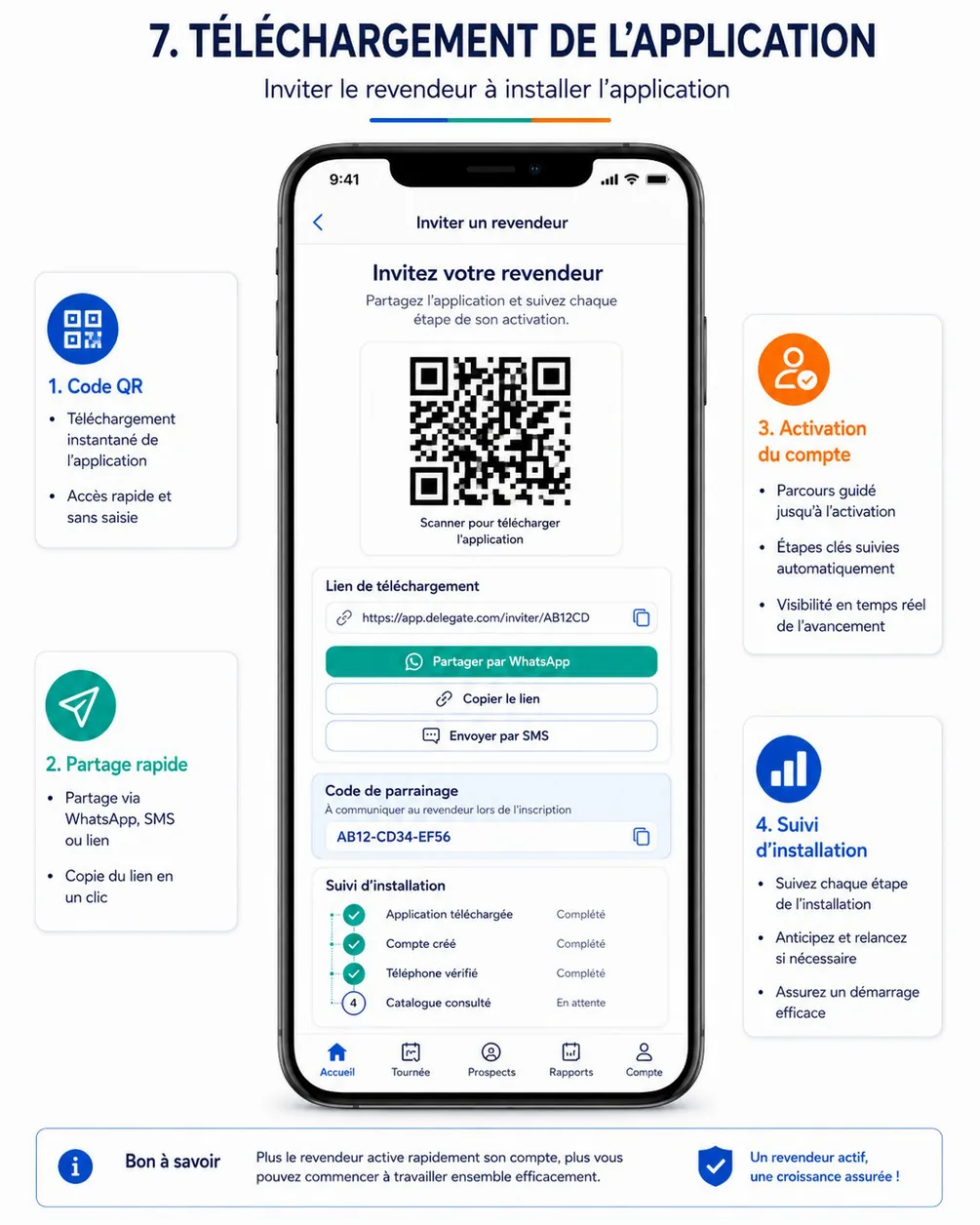
| Reference screen | Cahier | Becomes |
|---|---|---|
reseller-01-home | §5 | RA-09, RW-02 |
reseller-02-catalog | §5.1 | RA-10, RA-12, RA-13, RW-03 |
reseller-03-product-detail | §5.2 | RA-14, RA-15, RW-04 |
reseller-04-cart-checkout | §5.3 | RA-17, RA-18, RW-06, RW-07 |
reseller-05-orders-tracking | §5.4 | RA-21, RA-22, RW-08, RW-09 |
reseller-06-promotions-loyalty | §5.5 | RA-24 in V1; RA-37, RA-38, RA-39 in V2 |
delegate-01-login-profile | §6 | DA-02, DA-24 |
delegate-02-home | §6.1 | DA-05 |
delegate-03-tour-program | §6.2 | DA-06 |
delegate-04-map-navigation | §6.3 | DA-08 |
delegate-05-visit-checkin | §6.4 | DA-10 |
delegate-06-reseller-signup | §6.5 | DA-14 |
delegate-07-invitation | §6.6 | DA-16 |
delegate-08-first-order | §6.7 | DA-17 |
delegate-09-visit-report | §6.8 | DA-12 |
delegate-10-tour-closing | §6.9 | DA-20 |
Where the reference screens contradict the specification, the specification wins — these deviations are resolved during the screen-inventory validation (DES-05):
- V2 content on V1 screens. The home shows loyalty points and a Points shortcut; the promotions screen shows packs, levels and rewards. V1 hides them (LOY-03, PRM-06).
- Identifier formats. The order list shows
#CMD-2024-0158; the canonical format isCMD-2026-000158. The invitation showsapp.delegate.com/inviter/AB12CDand the codeAB12-CD34-EF56; the canonical link ishttps://app.hoco.dz/i/AB12CD34and the code has 8 characters,AB12-CD34(ADM-04, IVT-01). - Delegate navigation. Most delegate screens use Accueil · Tournée · Prospects · Rapports · Compte; the tour-programme screen uses Planning · Carte · Visite · Prospect · Rapport. One bottom navigation is chosen for the whole app.
- Conversion rate. Two different definitions appear (see Goals); one is kept.
- Product price and stock. The product page shows one price labelled Prix revendeur conseillé and « Plus que 20 pièces »; V1 shows the price of the reseller's customer type with the recommended retail price, and availability only — never a quantity (PRC-01, PRC-02, STK-07).
- Payment wording. The cart shows Paiement sécurisé with a padlock although V1 has no online payment; the checkout shows the payment method instead (FIN-02).
- Prospect status stepper. The sign-up form lets the delegate pick Compte créé or Revendeur actif; these statuses are automatic and shown read-only (CRM-04).
- Cart and checkout. The reference merges them on one screen; the inventory keeps a cart RA-17 and a checkout RA-18 so that payment method and credit availability have room.
The decisions of 17 Oct 2026 add surfaces that no reference screen shows; they are designed in the same visual language on the design day of their app (DES-06 to DES-10, DES-17 to DES-19): the guest price lock and sign-up prompts (RA-41); the customer-type choice in the sign-up form (RA-05); the advanced filter sheet with attribute filters and result counts (RA-13, RW-03); the fixed WhatsApp button of the reseller apps; live status updates on order screens without layout jumps; the return request (RA-40) and the after-sales claim form (RA-33); and in the back-office the « Commandes à confirmer » queue (BO-41), returns and after-sales (BO-69), support regions (BO-70) and attribute definitions (BO-71).
Design system first
Akram spends the first four working days on foundations and components before any screen (DES-01 to DES-04): colour (brand, neutral, semantic, and one tone per lifecycle status — the tone of every value in enums.json), typography with a Latin and an Arabic pairing, spacing, grid, radii, elevation and icons, exported as JSON tokens consumed by Flutter (hoco_ui) and Tailwind (@hoco/ui). The mobile and back-office component libraries follow, then the screen inventory is validated with Anis and Imad on day 5 (DES-05). Every status in every app is rendered by the same pill component, so Validée looks the same in the reseller app, the delegate app and the back-office. See the design system.
Outdoor readability for delegates
The delegate app is used in direct sunlight, often with one hand, by people walking between shops:
- Primary actions (Commencer la tournée, Arrivé, Terminer la visite, Terminer la tournée) are full-width buttons in the bottom thumb zone, at least 48 dp high, never two destructive actions side by side.
- Text and icons meet contrast for outdoor use — WCAG AA as a floor, no light-grey text on white for anything a delegate must read; key figures (distance, time, counters) are large.
- States are never conveyed by colour alone: GPS validation, sync state and visit status pair colour with an icon and a word.
- The sync indicator and the GPS state are visible on every field screen (SYN-06, FLD-07).
- Design QA includes an outdoor check on a real mid-range phone (DQA-03) and the field test measures it (MOB-13).
French copy, ready for Arabic
- Language. French in V1 for every interface (NFR-06). Status labels come from
enums.json(En attente, Validée, En préparation…); buttons are verbs (Valider la commande, Commencer la visite); messages say what happened and what to do next (NFR-07). The copy for every notification, SMS, email and share text is written once in a copy deck (DQA-10). - Formats. Amounts in DZD with French grouping (1 250 DA), dates and times in
Africa/Algiers, phone numbers shown in local format (0555 12 34 56) and stored in E.164. - Right-to-left readiness. Layouts use start and end rather than left and right, directional icons mirror, no text is baked into images, and the Arabic font pairing is chosen in the design system; Arabic can ship without redesign when HOCO decides.
Accessibility
Cahier §9 asks for readable contrast, reachable buttons, consistent text sizes and explicit messages (NFR-07). Concretely: WCAG 2.1 AA contrast (4.5:1 for text, 3:1 for large text and controls), touch targets of at least 48 × 48 dp, layouts that survive a larger system font size without hiding actions, screen-reader labels on icon buttons, and error messages that name the field and the fix. Imad runs an accessibility pass on both apps after design QA (MOB-17).
Density for the back-office
Back-office users spend the day in it. Tables are dense and sortable with sticky headers, 25 rows per page by default, filters kept in the URL so that a view can be shared, bulk actions where the API offers them, and keyboard-friendly forms. Of the 66 V1 back-office screens, 21 are bespoke (dashboards, the live map, the order detail, the tour planner and editor, the validation queue, the roles matrix…) and 45 reuse page templates (list, detail, form, settings), which keeps design and build effort proportionate. The back-office works on desktop, tablet and large screens (NFR-05); design QA checks all three (DQA-04).
System states are designed, not improvised
Offline, maintenance, forced update, empty lists, loading, errors, GPS off, out of tolerance and permission denied each have a designed state (RA-36, DA-28). Every list has an empty state that says what to do; every error maps to a stable API code and a French message.
8. Technical considerations
The decisions below are summarised from the canonical technical brief; each links to the page that specifies it.
| Decision | What it means for the product | Why | Specified in |
|---|---|---|---|
| One API, one database | Every interface reads and writes the same records through https://api.hoco.dz/v1 (staging api-staging.hoco.dz; domain to confirm); a status changed in the back-office is the status the reseller sees | Cahier §2 architecture principle; no synchronisation between systems | Architecture and data |
| Modular monolith, two processes | 24 server modules in one image; the api process serves HTTP, the worker process runs BullMQ jobs and the scheduler | One deployable for a small team; module boundaries kept for later extraction | Service catalogue, jobs and scheduler |
| Contract-first REST with oRPC | Each route is declared once in packages/contracts (Zod schemas and method/path), served as plain REST, and published as OpenAPI 3.1 (/openapi.json, human reference at /reference); Flutter generates its Dart client from it, the Next.js apps use the typed oRPC client; a mock server exists from the day the contract is published | Flutter cannot consume tRPC; one contract keeps four clients consistent; the mobile track starts before the endpoints exist | API reference, architecture decisions, mobile |
| Guest access | Catalog, banners, promotions and WhatsApp-support operations accept anonymous calls (auth: optional); for guests the API returns price: null with priceLocked: true, never a stock quantity for anyone outside the back-office | Guest browsing without prices (AUTH-10) and availability-only stock (STK-07) are enforced by the API, not by the apps | Catalog API |
| Three prices per variant | ProductVariant carries priceSuperGros, priceDemiGros, priceDetail (HT centimes), vatRate, recommendedPrice and the restricted purchasePrice; the reseller's customerType selects the price, promotions apply on top; no price lists or quantity tiers in V1 | Decision of 17 Oct 2026 (PRC-01, PRC-02) | Database design |
| Shared API conventions | camelCase JSON, UPPER_SNAKE_CASE enums from enums.json, UUIDv7 ids, human-readable business numbers, money in integer centimes of DZD, UTC timestamps with business days in Africa/Algiers, cursor pagination for apps and page pagination for back-office tables, a stable error envelope localised by Accept-Language | Four clients, one behaviour; predictable errors that the apps translate into screens | API reference, errors |
| Idempotency where retries happen | Idempotency-Key required on checkout, sync and every delegate mutation; the same key and body replay the original response (Idempotent-Replayed: true), a different body is refused (409 IDEMPOTENCY_KEY_REUSED); records kept 30 days | Mobile networks time out and retry; an order or a visit must never be created twice | Cart and checkout API, sync API |
| Offline-first delegate app | A local database and an outbox of idempotent mutations; /sync/batch replays up to 50 actions in order with one result each; /sync/delta pulls changes; the app generates UUIDv7 ids for prospects, ad-hoc visits, photos, reports and notes; device time is kept as occurredAt and implausible values (more than 5 min ahead or older than 72 h) are rejected | Cahier §7.3: weak network inside shops and in some communes | Offline sync design, mobile |
| GPS policy | Check-in tolerance 150 m with accuracy ≤ 100 m; sampling only while a tour is in progress, every 5 min or 200 m; positions kept 90 days; consent screen — all settings, several still open decisions | Cahier §6.3, §8, §10; privacy of employees | Business rules, field operations |
| Two real-time streams | Back-office: Server-Sent Events at /v1/admin/events with Last-Event-ID resume, filtered by permission (new orders, orders to confirm, check-ins, tours, positions, stock alerts, returns, claims). Resellers: their own stream at /v1/events while the app or web page is open (order status, assisted orders awaiting confirmation, ticket replies, returns); push notifications cover the rest, and the delegate app relies on push and sync | One-way updates are enough; SSE crosses proxies and needs no socket infrastructure; a reseller sees each status change the moment it happens (ORD-15) | Real-time events, notifications API |
| Transactional outbox | Events are written in the same transaction as the change and dispatched by the worker to notifications, SSE, analytics aggregates and CRM lifecycle automation | No lost or phantom notification; automatic status changes stay consistent | Architecture and data, notifications matrix |
| Sessions and devices | Better Auth; bearer token on mobile with X-App-Version, X-App-Platform and X-Device-Id; httpOnly cookie on .hoco.dz for the web apps; rate limits on sign-in and OTP | Cahier §10 | Authentication API |
| Files | Pre-signed uploads valid 10 minutes, then completion; private files read through 5-minute signed URLs; product images, logos and banners public behind a CDN | Cahier §10: protected documents | Files API |
| Integrations | V1: maps, FCM, SMS gateway, transactional email, S3-compatible storage. V2: carrier API, WhatsApp Business, ERP and stock-system synchronisation. Costs, quotas and approval delays validated by HOCO | Cahier §11 | Integrations |
| Environments and hosting | Local (docker compose), staging (auto-deployed from dev), pre-production for acceptance, production from master tags; Dokploy on a VPS for server, back-office and web; this documentation on the same VPS later, with restricted access | Cahier §13.1 | Deployment and operations |
| Mobile architecture | One Flutter workspace with two apps (dz.hoco.reseller, dz.hoco.delegate) and shared packages — generated API client, design system, offline outbox, maps, catalog and cart widgets reused by the delegate's assisted order; flavors dev, staging, prod | Two apps, one codebase discipline; the assisted order reuses the reseller cart | Mobile |
9. Success metrics and instrumentation
Every metric of section 2 is computed on the server from business records, never reconstructed from client analytics, so the same number appears on the dashboard, in the report and in its export (ANA-04). Business events are written to the outbox in the same transaction as the change; the worker turns them into daily aggregates for the dashboards and reports (SRV-25), and into real-time events for the counters that must move at once.
What is measured where
| Metric | Computed from (server records and events) | Client-side signal | Shown in |
|---|---|---|---|
| Account activation, connection frequency | User account status, Reseller, daily session-activity aggregate | — | BO-04, BO-59 |
| Guest-to-sign-up conversion (app) | Anonymous catalog calls carrying X-Device-Id, then a sign-up from the same device | — | BO-59 |
| Invitation funnel | InvitationEvent (sent → installed → account → verified → catalog viewed → first order) | First open with the install referrer (invitations.attribute) | BO-17, BO-59 via admin.invitations.list, DA-16 |
| Field conversion | Reseller (source, creator), ResellerStatusChange, first-order flag on Order | — | BO-17, BO-59, DA-05, DA-21 |
| Digitalisation share | Order.channel and status history | — | BO-04, BO-05, BO-59 |
| Confirmation lead time and queue age | OrderStatusChange (SUBMITTED → VALIDATED or REFUSED), events order.created and order.to_confirm | — | BO-41, BO-04, BO-59 |
| Tour performance | Tour, Visit, TourStatusChange, check-in distance and accuracy; events tour.started, visit.checked_in, visit.completed, tour.closed | Sync queue age on the device | BO-06, BO-17, BO-23, DA-20, DA-21 |
| Order frequency and repeat ordering | Validated orders per reseller | — | BO-05, BO-59 |
| Operational quality: cancellations, refusals, corrections, lead times, returns, claims | OrderStatusChange, OrderChange, Delivery, ReturnRequest, Ticket of type AFTER_SALES | — | BO-04, BO-42, BO-69, BO-59 |
| Technical health | API logs, error rates and latency per operation (NFR-08) | Crash-free sessions, cold start, slow screens (Sentry) | Monitoring, reviewed daily during the pilot |
| Sync health | Per-item results of sync.batch (APPLIED, REPLAYED, CONFLICT, REJECTED, RETRY) | Pending items and their age (DA-27) | Monitoring and BO-23 |
Assumption — no third-party product-analytics SDK is embedded in V1: business metrics come from server records, technical metrics from Sentry and the server logs. This keeps personal data inside the platform (Law 18-07, SEC-08); adding an analytics SDK later is a decision for HOCO.
Pilot go / no-go criteria
The pilot (two weeks, a limited group of delegates and resellers, in production) ends with the Pilot go / no-go milestone. Proposed criteria — proposed, to validate with HOCO at the cadrage:
| Criterion | Threshold for "go" | Measured from |
|---|---|---|
| Blocking defects open | 0 | Defect tracker |
| Crash-free sessions, both apps | ≥ 99 % | Sentry |
| Offline actions lost | 0; CONFLICT + REJECTED below 1 % of replayed items | sync.batch results |
| Pilot tours closed the same day with complete data | ≥ 90 % | Tour, closing previews |
| Check-ins within tolerance | ≥ 90 % | Visit check-in distances |
| Pilot resellers with an active account | ≥ 80 % | User, Reseller |
| Orders of pilot resellers placed through the apps or the web | ≥ 50 % | Order.channel |
| Orders confirmed within the same business day | ≥ 95 % | OrderStatusChange |
| Catalog search and filters, 95th percentile on a mid-range phone | under 3 s | API latency and Sentry |
10. Risks and mitigations
Likelihood and impact are High, Medium or Low. Owners are the people who act on the early signal; decision ids refer to the decision register.
| Risk | Likelihood | Impact | Mitigation | Owner | Trigger / early signal |
|---|---|---|---|---|---|
| The three-month frame on Anis's lane. Server, back-office, reseller web, DevOps and docs are one lane; V1 — design, development and deployment — must fit from 18 Oct 2026 to mid-January 2027, with go-live at the start of January and the pilot right after | High | High | Contract-first API and mock server so the mobile track never waits; 45 of the 66 V1 back-office screens built from templates; the reseller web reuses the back-office foundation and the reseller API; no code before the specifications are done, then no rework; the levers of the timeline applied the same week — spend the visible buffers, move non-essential V1 scope after go-live with HOCO's agreement, shorten the pilot to one week, add a second TypeScript developer on the back-office, cut scope only through change requests | Anis | A milestone of Anis's lane (Server V1 feature-complete, Back-office and reseller web V1 feature-complete) slips by more than two working days on progress; Production go-live computed after the frame's deadline in the milestones table |
| HOCO's decisions arrive late — customer-type prices and criteria, payment and credit policy, legal mentions, hosting, SMS provider | High | High | Cadrage workshop on day 1 (PRJ-03); every decision has an owner, a "needed by" task and a default that the build implements as a setting, so a late answer is a configuration change, not a rework (D-01, D-04, D-21) | Anis with HOCO's sponsor | A decision still open when its "needed by" task starts |
| Customer type misdeclared — resellers declare Super-gros to get the lowest price | High | Medium | Criteria of each type shown at sign-up (D-01); type reviewed at validation with the delegate's proposal side by side (BO-13); no order before validation; later changes by the back-office only, audited (AUTH-11) | HOCO commercial | Declared mix far from HOCO's known customer mix; type changed at validation for more than 20 % of accounts |
| Manual confirmation becomes a bottleneck — every order waits for a person (ORD-14) | Medium | High | One queue, oldest first, with control results and one-click confirmation when everything passes (BO-41); live arrival of new orders; several orders.validate holders with a coverage rota agreed with HOCO; queue age on the dashboard (G3) | HOCO commercial, Anis | Oldest order in « Commandes à confirmer » older than one business day; median confirmation time above 2 business hours during the pilot |
| SMS sender approval delayed — no OTP means no sign-up and no password reset | Medium | High | Provider chosen at the cadrage (D-13); sender registration started in P0; simulator in staging; a second provider identified as fallback | HOCO, Anis | No approved sender at Server V1 feature-complete |
| Play Store review of location use in the delegate app | Medium | High | Foreground service with a visible notice during tours only, no background-location permission (D-24); data-safety form, declaration and video prepared in MOB-14; closed track used early | Imad | Rejection or policy warning on the internal or closed track |
| Availability-only stock causes orders that cannot be served — resellers cannot see how many units are left (STK-07) | Medium | Medium | Maximum per order on each variant; blocking STOCK_INSUFFICIENT issue in the cart; quantity reduced with a reason at confirmation and shown live to the reseller (ORD-05, ORD-15); alert thresholds keep En stock honest (STK-05) | HOCO stock, Anis | More than 5 % of orders modified for stock at confirmation |
| Catalog data incomplete — filters and the three prices depend on data HOCO must enter: attributes per category, three prices per variant, customer type of imported resellers | Medium | High | Import templates with the three prices and the category attributes (CAT-06, ADM-06); a variant cannot be published without its three prices; attribute-completeness check before acceptance; import rehearsal on pre-production | HOCO stock and commercial | Dry-run error rate above 5 % of rows; fewer than 80 % of active variants valued on their category's attributes before acceptance |
| GPS accuracy in dense city centres puts delegates out of tolerance | Medium | Medium | Tolerance 150 m and accuracy ≤ 100 m as settings (D-06); accuracy shown before check-in; distance recorded for review; field test in Oran-like conditions (MOB-13) | Imad, HOCO | More than 10 % of check-ins out of tolerance during the field test or the pilot |
| Offline sync conflicts or lost field data | Medium | High | Client-generated UUIDv7 and idempotent replay; per-item results; conflicts shown in the sync centre, never retried silently (SYN-05); closing blocked while data is unsynced (FLD-12) | Anis, Imad | CONFLICT + REJECTED above 1 % of replayed items; a device queue older than 24 h |
| Acceptance and pilot at the turn of the year — HOCO's availability for acceptance sessions over the end-of-year period, Yennayer (12 Jan) inside the pilot | Medium | Medium | Acceptance sessions booked at the cadrage; Yennayer removed from every lane; pilot group chosen in advance (D-32). Ramadan starts after the pilot, so field hours are normal | Anis, HOCO | Acceptance sessions not scheduled by Back-office and reseller web V1 feature-complete |
| Hosting location and personal-data law (Law 18-07) | Medium | High | Hosting and data location decided before go-live (D-15); retention table (D-11); privacy policy published with the store listings (SEC-08) | HOCO legal, Anis | No hosting decision at Staging integration complete |
| After-sales and returns volume or abuse | Medium | Medium | Return and claim windows (D-35); photos mandatory; quantities limited to delivered minus already claimed; claim history per reseller; defective units never re-entered in stock (SUP-04, ORD-13) | HOCO commercial | Claim rate above 2 % of delivered orders; repeated claims by the same reseller |
| Regional WhatsApp numbers not staffed — the button opens a number nobody answers | Medium | Medium | One national region and number by default (D-36); hours shown before opening; regions editable without a release (BO-70) | HOCO | Complaints about unanswered WhatsApp messages during the pilot |
| Live order updates unreliable on mobile networks | Medium | Low | The stream is a convenience while the app is open; push and the inbox are the guaranteed channel; Last-Event-ID resume and a refresh when the app returns to the foreground (ORD-15) | Anis, Imad | Tickets saying a status was not updated; high reconnect rate in the logs |
| Reseller adoption — shops keep ordering on WhatsApp | Medium | High | Delegate-led onboarding: invitation, account claim, first-order assistance; QR flyer (DQA-07); guest browsing lowers the first step; phone orders entered in the back-office so the shift is measured, not forced (ORD-11) | HOCO commercial, delegates | Activation below target in the pilot; invitation funnel dropping at Compte créé |
| Credit risk on orders paid on credit | Low | High | Credit only for resellers given a limit (D-29); over-limit orders blocked by default (D-04); overrides by finance.validate only, logged (FIN-05) | HOCO finance | Overdue amount growing month on month; frequent overrides |
| Scope creep against the cahier's clause « Toute fonctionnalité non décrite… » | High | High | This PRD's non-goals; every new request goes through the change-request process, estimated and scheduled after go-live or in V2 | Anis | New requests during the design review (DES-22) or the pilot |
| iOS demand appears late | Low | Medium | The reseller web serves iPhone users from the pilot on; Flutter keeps iOS buildable; the iOS task runs after the three months on HOCO's decision (D-10, MOB-16) | HOCO | Pilot resellers asking for an iPhone app |
11. Open questions
The questions below block or shape V1. Each has a default that the build implements until HOCO decides; the full register — owner, "needed by" task, options and impact — is the decision register.
| Question | Decision | Default built until decided |
|---|---|---|
| Criteria of each customer type and the three prices per variant | D-01 | HOCO supplies three HT prices per variant; type descriptions from the enum |
| Prices visible before account validation | D-18 | Prices of the declared type right away; ordering after validation |
| Prices displayed TTC or HT | D-17 | TTC, HT in the breakdown |
| Quantity tiers dropped from V1 | D-37 | Dropped — customer-type prices and promotions only |
| Stock reservation and deduction statuses | D-22 | Reserve at confirmation, deduct at shipping |
| Minimum order amount and quantity rules | D-19 | 10 000,00 DA; minimum 1, step 1, maximum 999 |
| Payment methods at launch, credit policy and eligibility | D-03, D-04, D-29 | All five methods; credit only with a limit; over-limit orders blocked |
| Return and after-sales windows, warranty rules | D-35 | Returns within 7 days of delivery; claims within the product warranty |
| Support regions and their WhatsApp numbers | D-36 | One national region and number |
| GPS tolerance, sampling frequency, visibility and retention | D-06, D-07 | 150 m with accuracy ≤ 100 m, blocking; tours in progress only, every 5 min or 200 m; 90 days |
| Assisted-order confirmation delay | D-23 | 72 h, reminder 24 h before |
| Delivery carriers and fees | D-08, D-20 | Structured manual carriers; free delivery |
| Invoice legal mentions and stamp duty on cash payments | D-21 | Mentions of the document brief; go-live blocked until confirmed |
| SMS provider, maps provider, hosting and data location, final domain | D-13, D-14, D-15, D-12 | Simulator in staging; Google Maps Platform; production location before go-live; hoco.dz as working assumption |
| Languages at launch and iOS | D-09, D-10 | French only, Arabic prepared; Android only, iPhone users on the reseller web |
| Data retention and deletion requests | D-11 | The proposed retention table |
| Pilot timing and group | D-32 | Two weeks right after go-live, limited group |
| Open sign-up or invitation-only; who validates new points of sale | D-28, D-30 | Open sign-up with validation; crm.validate holders |
| The proposed targets of section 2 and the pilot criteria | Cadrage workshop (PRJ-03) | Targets as proposed, re-based at the Pilot go / no-go |
| One definition of the delegate's conversion rate | Cadrage workshop (PRJ-03) | Field conversion of the current month, as defined in success indicators |
Tools
The toolchain of both repositories with versions and purpose, the services the team uses, and the commands everyone runs every day.
User flows
Every journey across the reseller app, the reseller web, the delegate app and the back-office — flowcharts, sequence diagrams and the reseller lifecycle, traced to requirements, screens and API operations.